A.GARDNER
//PD
PortfolioAboutResumeContact Me
Menu
CASE STUDY
Complex Health Data Into Insights With AI
Tracking health data is easy. Making sense of it isn't. I explored how AI could close that gap for Live Tula patients — turning complex, multi-stream health data into insights that actually inform behavior change.
AI Product Strategy
Discovery
AI Design Constraints
CASE STUDY
It Wasn’t User Preference, It Was Poor Mobile Design
Owala partnered with a third-party customization platform with a track record of loosing mobile users to desktop. By reframing I significantly increased mobile engagement and proved that the right UX diagnosis can unlock growth that the platform alone never could.
Design Excellence
Reframing Problems
Solution Oriented
CASE STUDY
Reframing the Problem
A youth sports startup had too many ideas and no clear place to start — so we reframed the entire product direction mid-discovery. An unexpected insight shifted our mission entirely, sharpened our value proposition, and helped us launch faster with strong early adopter growth — showing that the best product decisions start with listening to user needs.
Critical Thinking
Product Market Fit
UI Design
Service Contract Management for CSG systems
CASE STUDY
Discover with Journey Mapping
Designed a white-label warranty claims experience for CSG International, I identified high-frustration steps through journey mapping that guided every design decisions. The result was a claims experience proven to be clear, easy to use, and emotionally considered — showing how I use research and iterative validation to de-risk complex products early.
User-Interview
Cognitive Load
0 to 1 Solution
Glymed+ signup redesign: the old Create an Account form and the new Register page with distributor branding
CASE STUDY
Product Alignment For Business Outcomes
A successful luxury skincare brand was growing every year but burning design time on the wrong priorities, so we reprioritized the roadmap based on subjective methods. The result was incremental improvements across bounce rates, cart abandonment, and user signups — showing that knowing what to design is just as important as knowing how to design it.
UX Strategy
E-Commerce
Data-Driven
Workbench mockup
CASE STUDY
Influenced by User Interviews
An outdated legacy tool was quietly slowing down engineers monitoring and resolving broken automated workflows. User interviews drove a full redesign within a modern design system, resulting in increased satisfaction and reduced time on task.
Design System
B2B
Saas
User Interviews
Visualizers
Graphic Design
Explorations in branding, wayfinding, packaging, and advetising design.
Aesthetic
Logo
Wayfinding
Packaging

Drop me a line!

I would love to hear from you.

Thank you! Your submission has been received!
Oops! Something went wrong while submitting the form.
PortfolioAboutResume
LinkedIn
A.GARDNER
//PD
Copyright©2024 All rights reserved.
Owala
Trove Brands
It Wasn’t User Preference, It Was Poor Mobile Design
Owala
Trove Brands

It Wasn’t User Preference, It Was Poor Mobile Design

The mobile problem was framed as user preference. Traffic data showed differently, so I redesigned the app and proved it wasn’t.

Intro—Project Overview

Company

Trove Brands is an e-commerce group that owns and operates multiple e-commerce brands like Blender Bottle, Canoo, and Oath Nutrition as well as the award-winning brand Owala®.

Owala® is a leading water bottle e-commerce brand that is known for its innovation.

Objective

Integrate a 3rd party customizer into the Owala site that allows customers to personalize their water bottles.

My Contribution

As the Principal UX Designer I did all the research, design and project management for the development of the solution.

I partnered with the Digital Marketing Director, who coordinated with fulfillment companies and hired the third-party vendor.

Design Excellence

Matched Mobile Traffic Patterns

82% of Owala's traffic is on mobile devices. The third-party platform projected the customizer would only capture a third of that on mobile. At launch, customizer mobile traffic matched the site's overall mobile traffic, closing the gap entirely.

Site Performance

2x in Sales

Ten months after launch, the customizer had driven a 2x increase in sales. Customers loved to personalize their bottles, increasing the average cart total. Almost half of all sales included personalizations.

0—The Underlying Problem

As we kicked off the project, the vendor gave us wireframes of their customizer to style. As I reviewed them, I had some concerns.

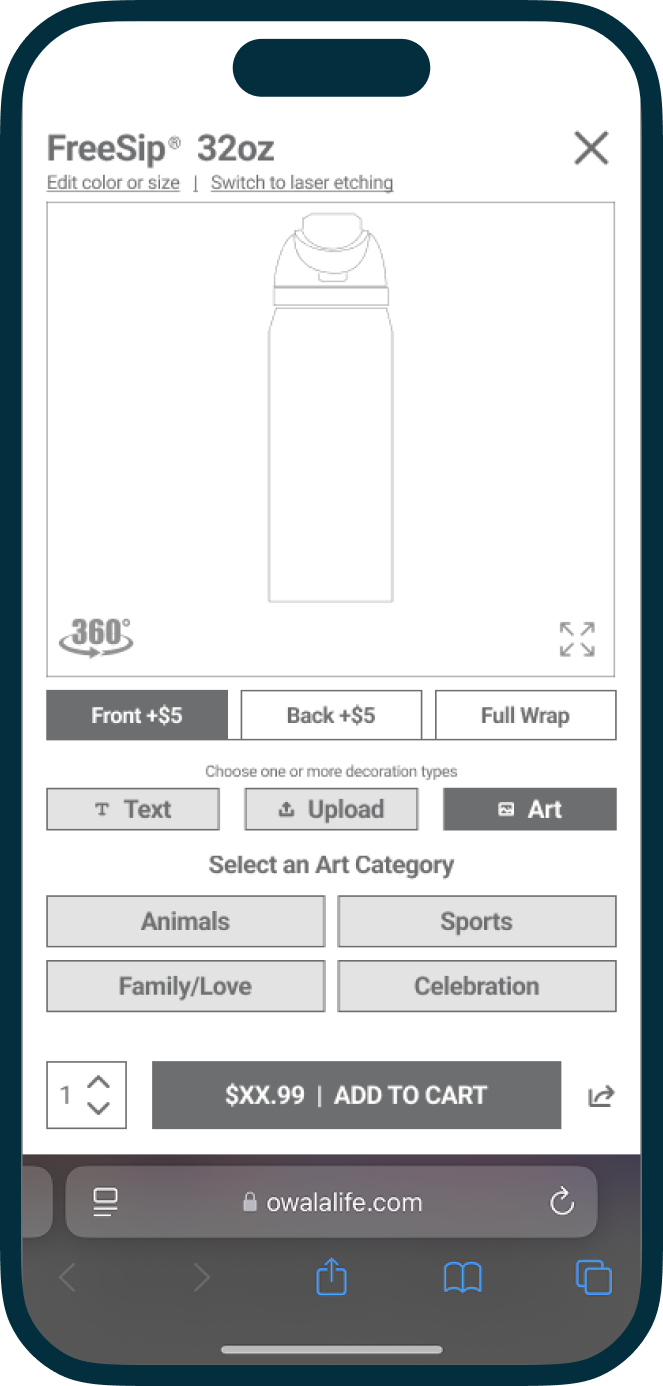
The vendor's original mobile customizer wireframe

Cognitive Load

Cluttered and unorganized editing functions cause users to have to think more.

Accessible Patterns

Small text and small buttons create small touch targets.

Limited Viewing Area

The small viewing area creates a challenge to be able to see the artwork effectively.

Responsive vs Adaptive

What works on a desktop does not work on a small mobile device.

The Crux

Framed as a User Preference

When the vendor was pressed on why this was not designed ‘mobile first’, they explained that their data showed that users typically switch from the mobile version to desktop to use the application.

“...users prefer to use the customizer on desktop over the mobile version...”

1—Reframing

Our traffic patterns for the Owala brand showed that customers predominantly used mobile devices to shop. If users had to switch from their mobile phones to a desktop it would negatively affect the adoption of this customizer.

82%

total traffic is on a mobile device

How might we...

design the mobile app so customers don’t have to switch to the desktop version?

2—Discovery

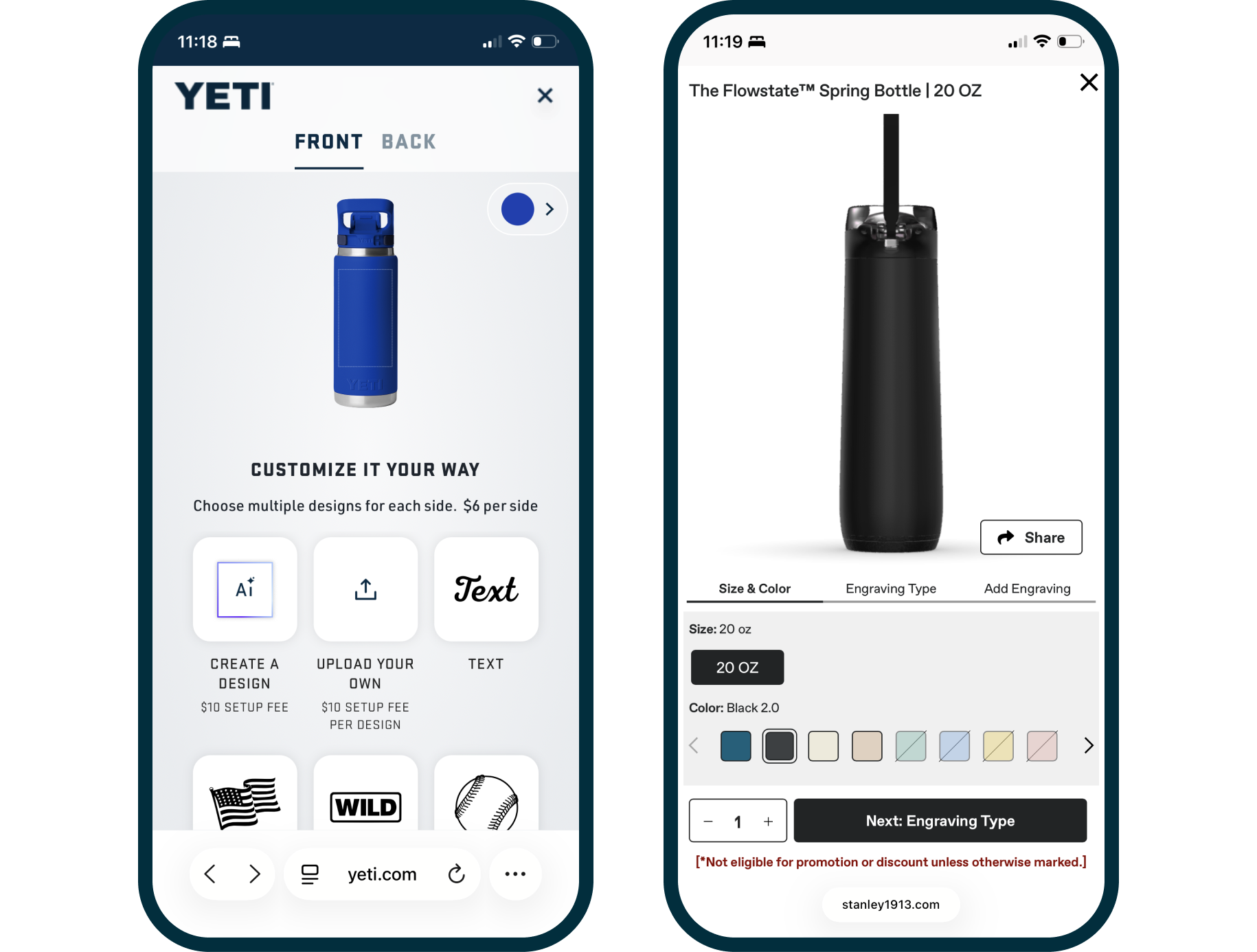
With a new objective set, we set off to figure out how we might improve the mobile experience. We started with a competitive audit to establish a benchmark and find our competitive edge, and identifying conventional patterns inspired new ideas.

YETI logoHydro Flask logoStanley logo
Competitive Audit

How are our competitors solving this?

Owala wasn’t the only brand offering bottle customization. As I audited competing customizers, it was clear this was not an easy problem to solve.

The customizers also struggled with:

  • Edit modal covering view area
  • Lacked the editing flexibility
  • Clunky workflows
Research & Inspiration

Conventional Mobile Patterns

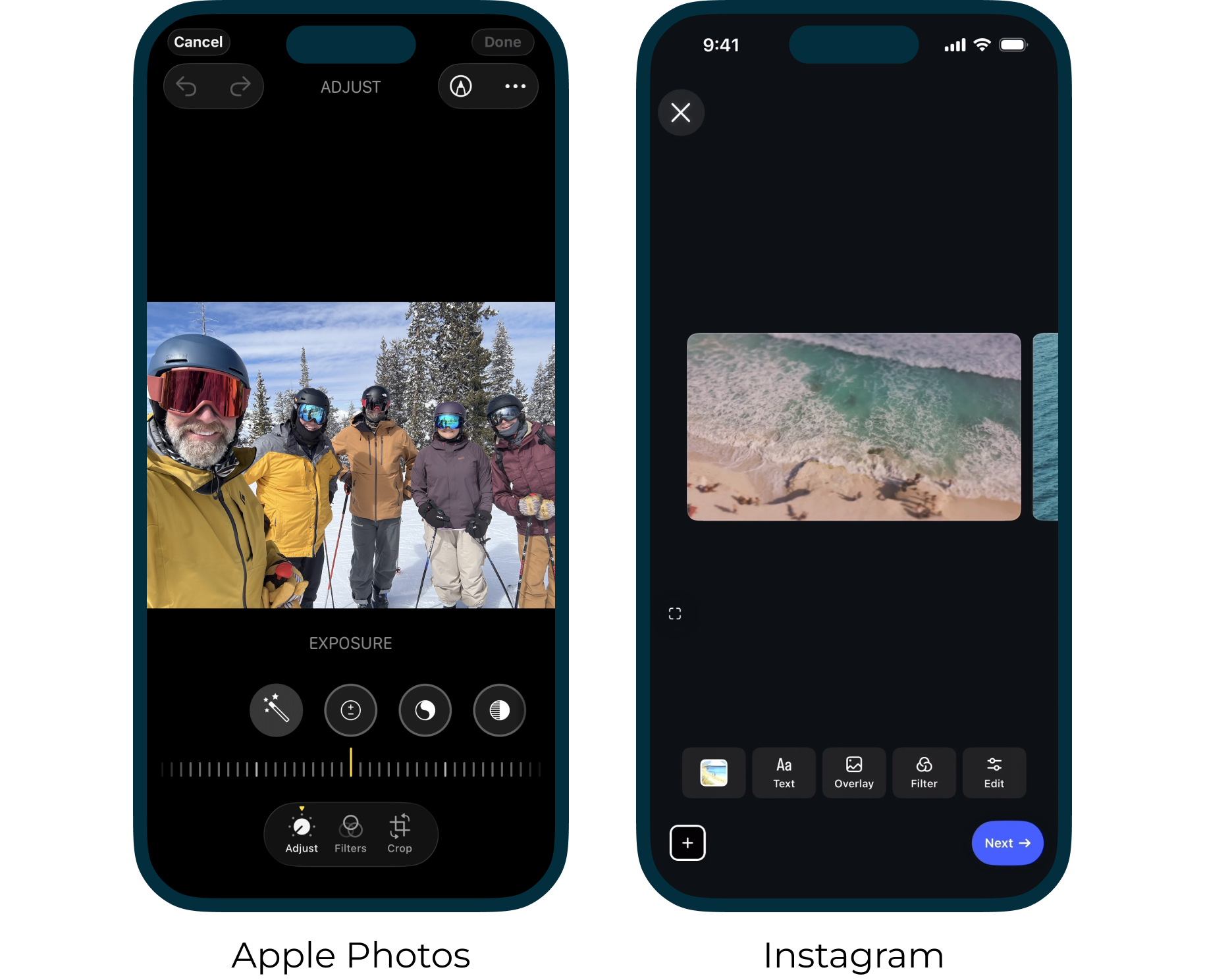
A number of apps already handle complex editing on mobile and prove it can work well. Two examples stood out that I drew inspiration from, giving me confidence that we could build something that worked just as well.

Conventional mobile interaction patterns:

  • Tool rails with horizontal scrolling
  • Progressive disclosure for editing capabilities
  • Direct manipulation editing
Apple Photos and Instagram mobile editing screens used as pattern inspiration

3—Explorations

As ideas emerged from sketching and prototyping, I worked to test and validate directions that would inform decision making and project direction.

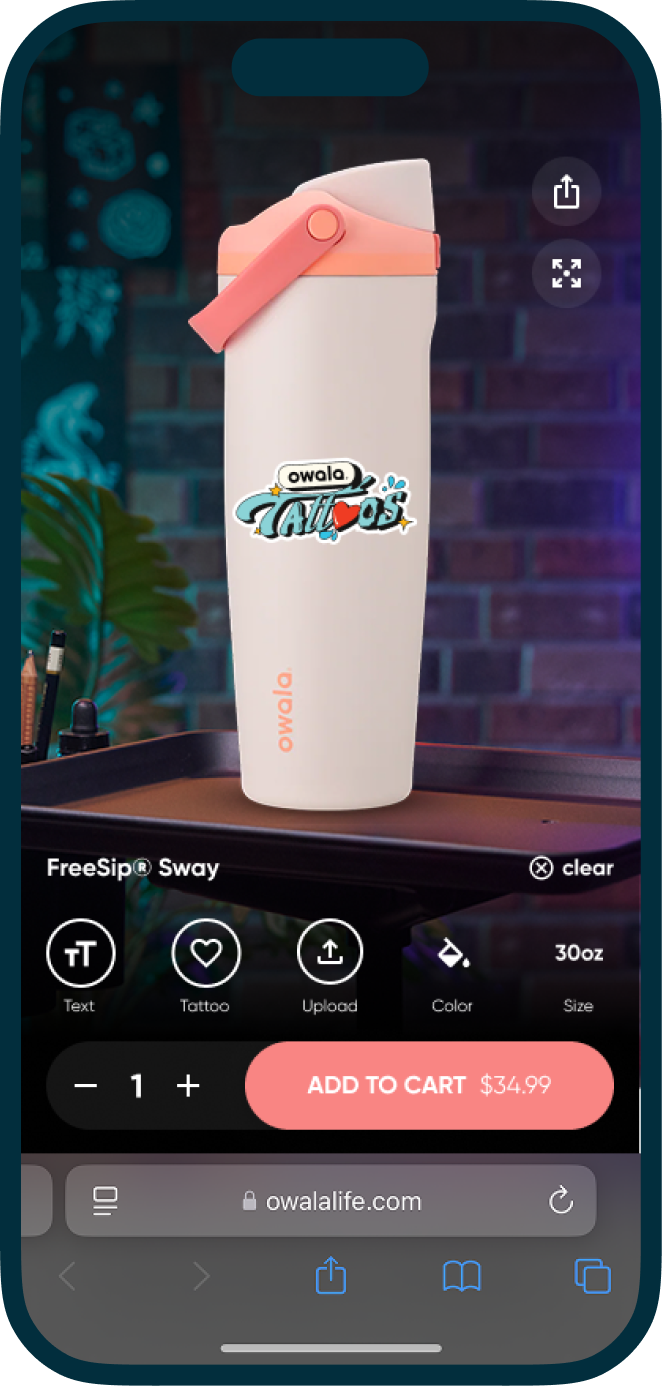
Immersive tattoo parlor exploration of the customizer

Immersive Tattoo Parlor

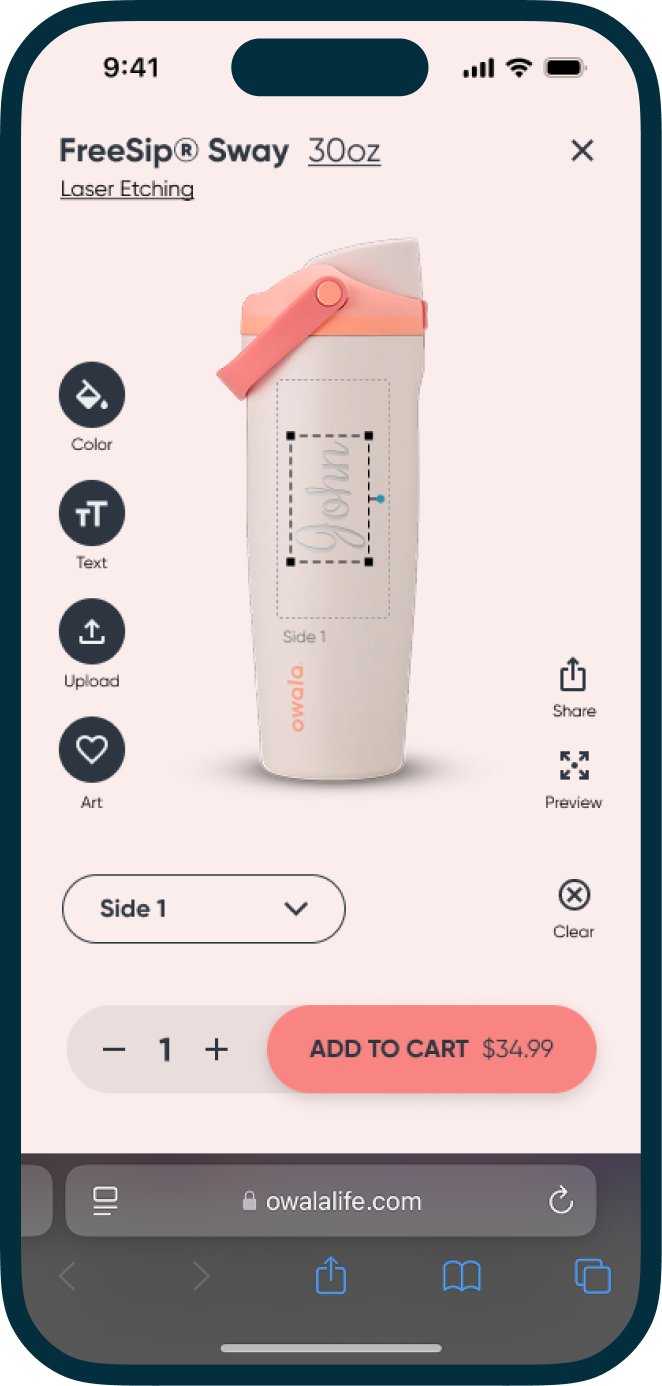
Accent background color exploration of the customizer

Accent Background Color

Prototyping

Tested Early & Often

Stakeholders and marketing wanted to see the bottle in a tattoo parlor to match the campaign for the new customizer, so I prototyped the idea.

After testing it, here’s what I learned:

  • The immersive experience keeps users engaged.
  • Immersive experiences like the parlor shop made the experience feel like an amusement park.
  • And more...

4—Trade-offs

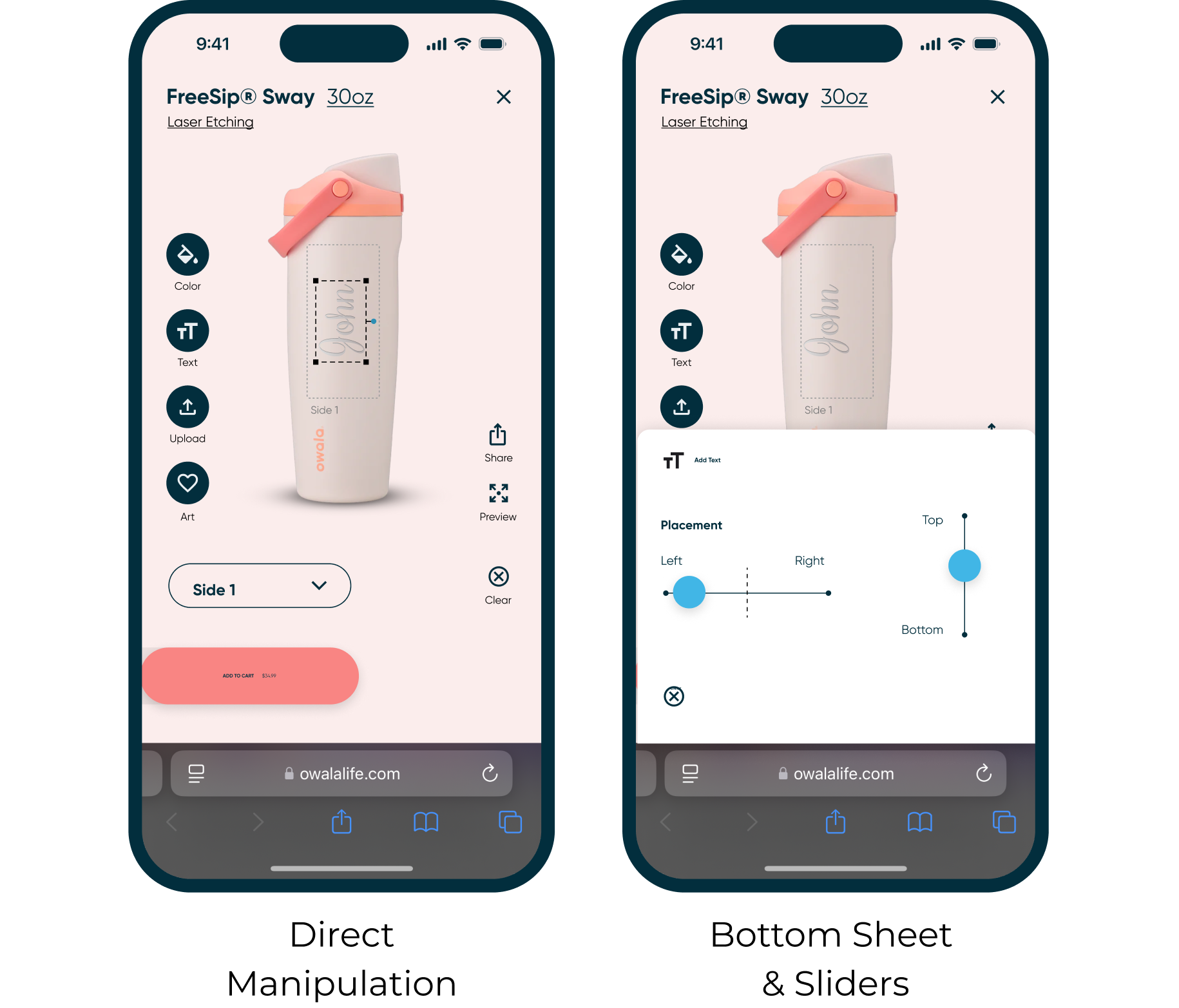
One idea that proved to be truly intuitive was allowing users to directly manipulate the artwork, but it was unsupported. I tested an alternative option that kept the project on time.

Decision Point

Direct Manipulation vs. Slider Controls

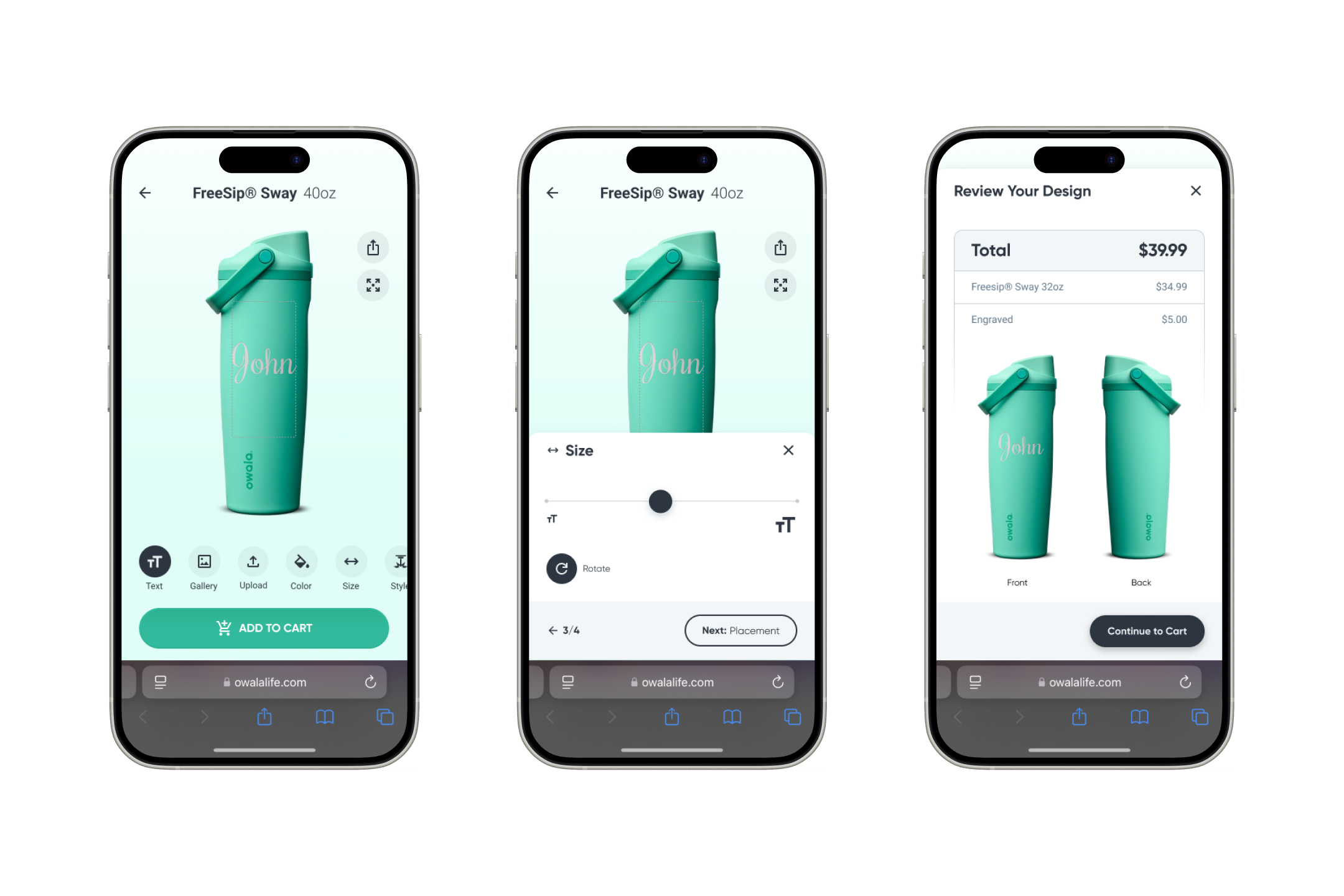
Direct manipulation patterns were proving to be the most intuitive solution for editing designs for the bottle. Because the platform didn’t support it, I brought the team a decision: push out the launch to develop it, or launch on time with less intuitive patterns.

These are the things we considered:

  • What is the cost of pushing launch?
  • Is the alternative option intuitive enough for users?
  • What other priorities would get pushed?
Direct manipulation versus bottom sheet and slider controls

Shipping a good experience on time beat shipping a better one late.

5—Final Solution

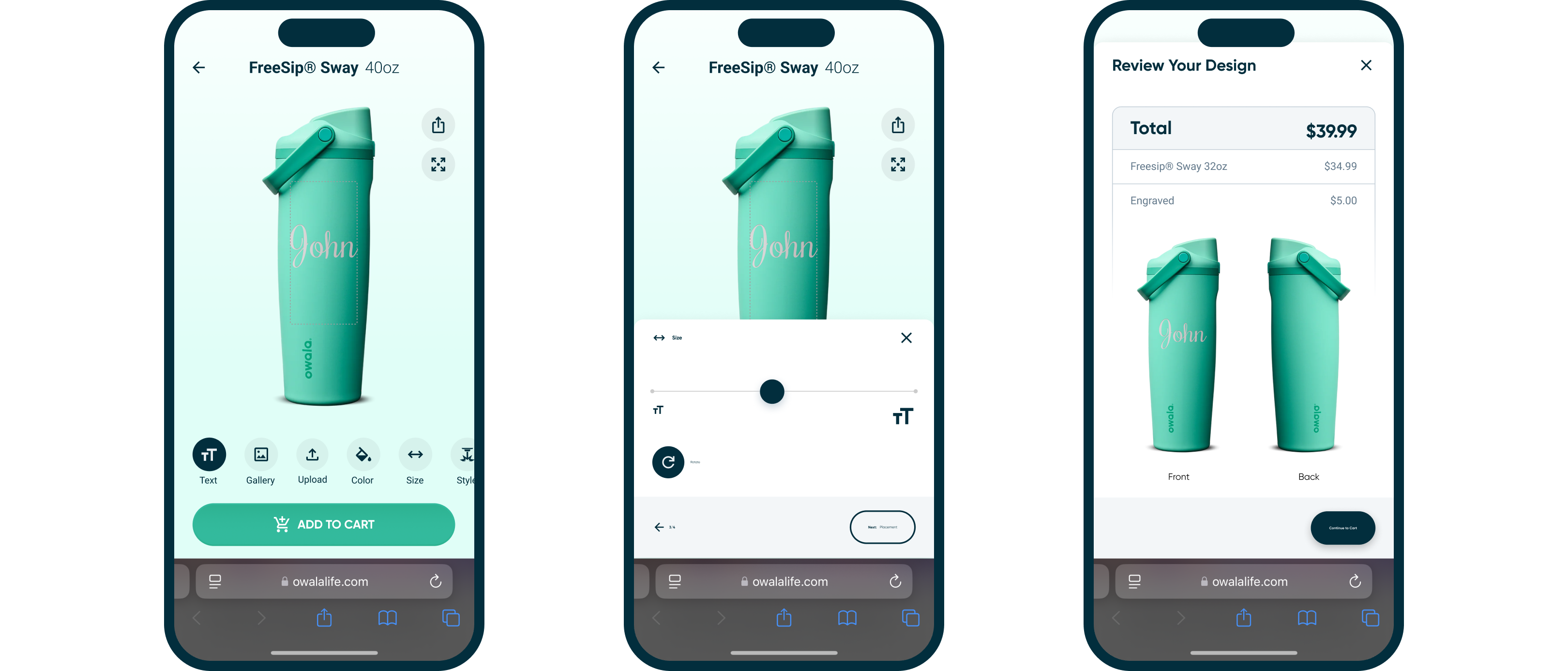
Working through technical constraints and refining mobile patterns, I felt confident that this solution was going to be great. As we developed and tested the solution, the feedback was overwhelmingly positive.

Final Owala customizer screens: editor, bottom sheet controls and design review
Solution

The Right Patterns

What I’m proudest of here isn’t the metrics, it’s the diagnostic. The mobile gap wasn’t a user preference problem. It was a design problem that looked like a user preference problem. Reframing that, finding the right pattern language to solve it, and shipping it within three months is the kind of work that reminds me why I do this.

Performance metrics are a signal of a problem. They rarely explain user preference.

Conclusions—Outcomes

When we soft-launched the customizer, we knew we had achieved what we set out to do: users no longer switched from mobile to desktop to use it. Mobile traffic never tapered off. Success!

Design Excellence

Matched Mobile Traffic Patterns

82% of Owala's traffic is on mobile devices. The third-party platform projected the customizer would only capture a third of that on mobile. At launch, customizer mobile traffic matched the site's overall mobile traffic, closing the gap entirely.

Site Performance

2x in Sales

Ten months after launch, the customizer had driven a 2x increase in sales. Customers loved to personalize their bottles, increasing the average cart total. Almost half of all sales included personalizations.

Postscript—Unintentional Impact

Launch wasn’t the finish line. Staying forward deployed after release meant owning what came next: the customizer’s influence across the industry, and the edge cases that only surface in the real world.

Competitor customizers adopting similar patterns
Benchmarking

Setting the Standard

After a year of our customizer setting the standard for customizers, competing brands like Yeti and Stanley started to adopt similar patterns.

Customer Satisfaction

Moderation Problems

We built a word moderator to screen out inappropriate text on custom bottles. What we hadn’t anticipated was that certain flagged words overlap with surnames from other cultures. It wasn’t a large volume of users, but for those affected it was a frustrating and at times distressing experience, and complaints surfaced quickly.

It was a humbling reminder that content moderation decisions have real human impact, and that building an inclusive list requires more cultural consideration than a basic blocklist.

Performance Issues

File-Translation QA

During QA, I noticed that low-quality uploaded images weren’t rendering as expected in the final printed output. The issue turned out to be a file translation problem inside Spectrum’s pipeline: the image we were showing users as a digital proof wasn’t the same file being sent to the printer.

This was caught because I spent real time testing the experience as a user would, not just checking that buttons worked, but interrogating the actual output quality end to end. Catching it pre-launch avoided what would have been a significant return rate and a credibility hit for a brand that had positioned this as a premium product.

Owala
Trove Brands

Conclusion—Why This Is Relevant

Problem Framing & Strategy

Reframed a metric as a hypothesis to test, not a fact to accept, then traced it to a root cause through competitive and pattern research.

Cross-functional Partnerships

Made tradeoff calls under real platform, timeline, and brand limits, validated with users, not assumed, and still hit the target.

Ownership in Ambiguity

First UX hire, no playbook, no dedicated PM. I drove alignment through process and caught a misdiagnosed problem that resulted in an industry standard for e-commerce customizers.

My Tula
Turning Complex Health Data Into Valuable Insights
My Tula

Turning Complex Health Data Into Valuable Insights

Making sense of complex health data is not easy. Using AI product frameworks, I transform complex data into sustained behavioral change.

Intro—Project Overview

Live Tula

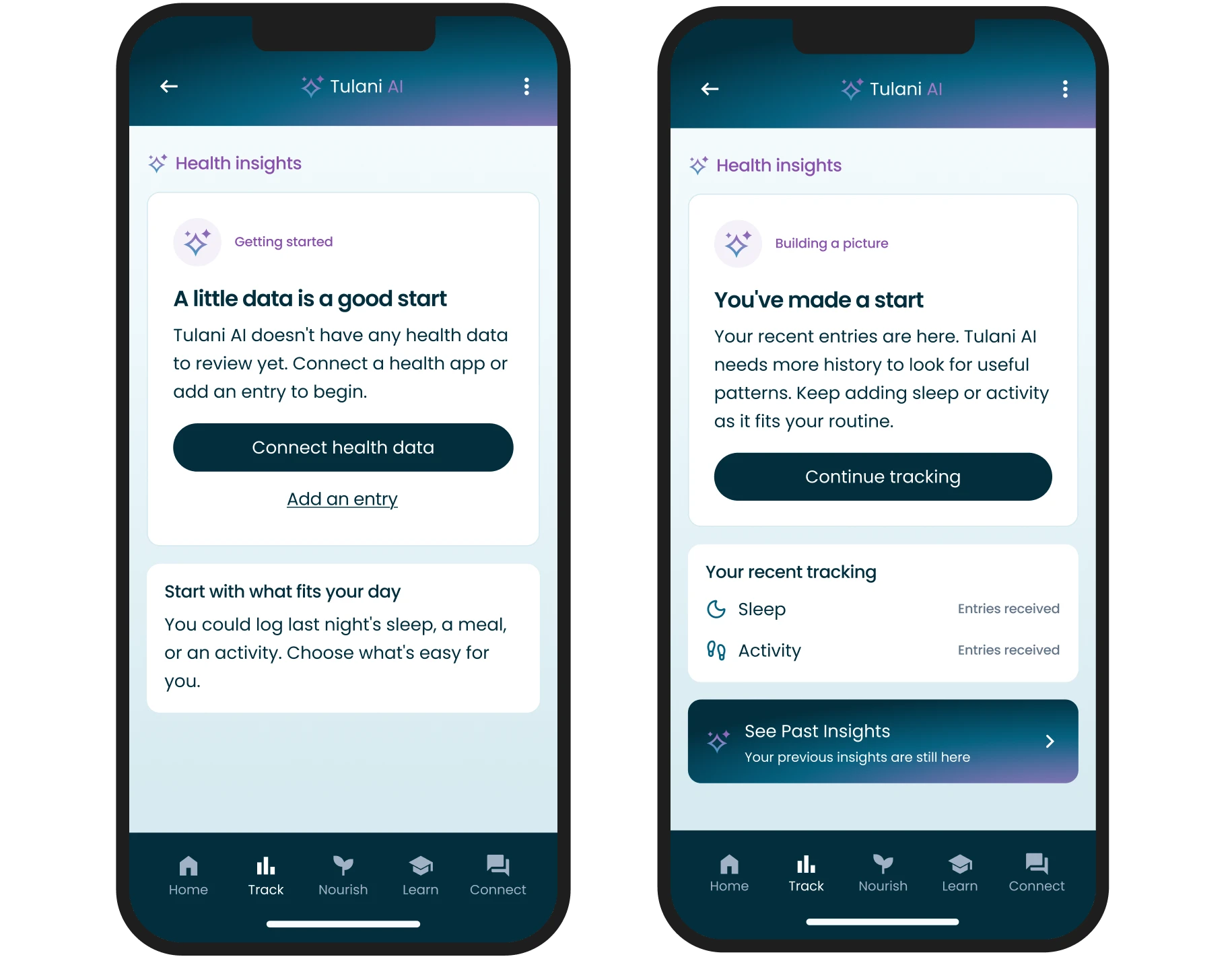
Live Tula is a metabolic-health program that helps people reverse chronic conditions like Type 2 diabetes through sustainable behavior change. Members get a care team of coaches, nurses, and dietitians, a meal planner and tracker, and health metrics integrated from smart wearables. This project introduced Tulani AI, an in-app companion that turns those metrics into personal insights.

Role

As Live Tula’s sole designer, I reported to the President. I owned the problem framing, research, and end-to-end design of Tulani AI. I partnered with the AI Architect on feasibility and constraints, and with the Head of Strategic Alignment on priorities and capacity. When the first redesign did not move engagement, I pushed the team to go back to members and coaches before building more, which changed the direction of the project.

The Problem

Members started strong, tracking sleep, activity, glucose, and meals. After about 4 weeks, most of them stopped engaging.

Early Signal

15% Lift in Daily Active Use

Measured across 1,000 early adopters over 3 months.

Program Impact

3% Decrease in Health Care Costs

Companies that offer Live Tula as a health benefit see this impact after the first year.

Overview—The Solution, End to End

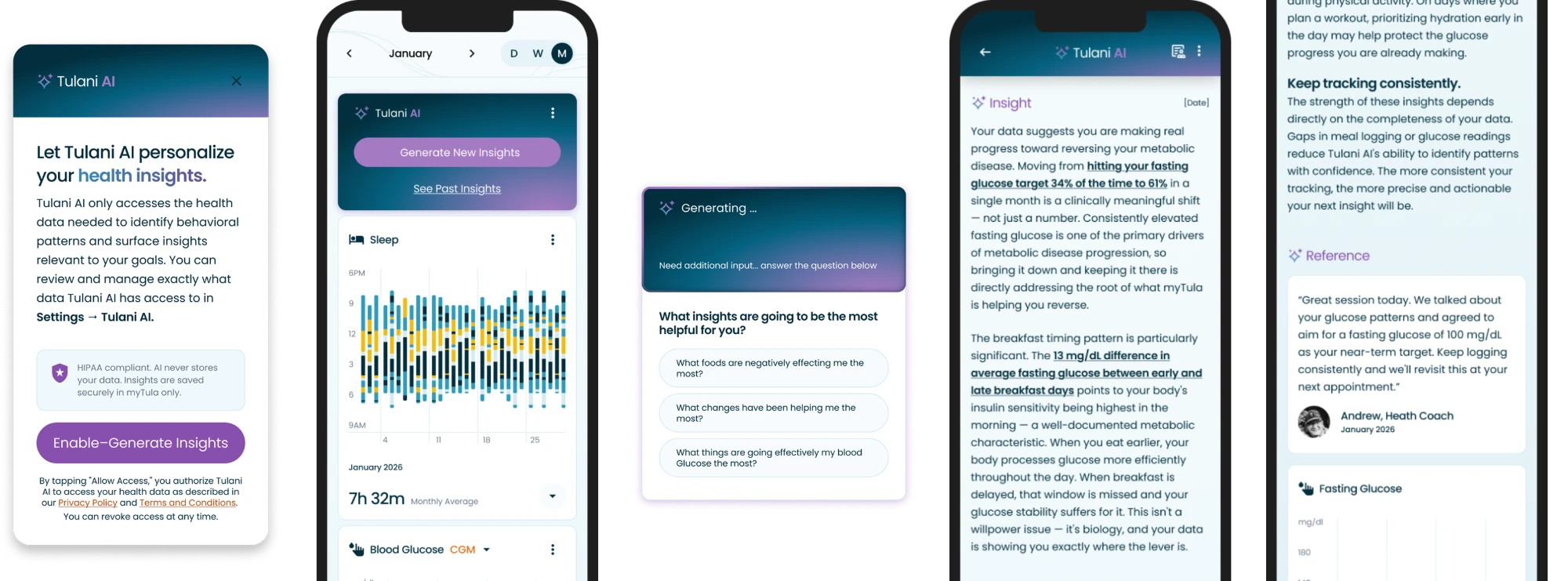
From opt-in to action, this is how a member uses Tulani AI to turn their own health data into a next step, with their care team still in the loop.

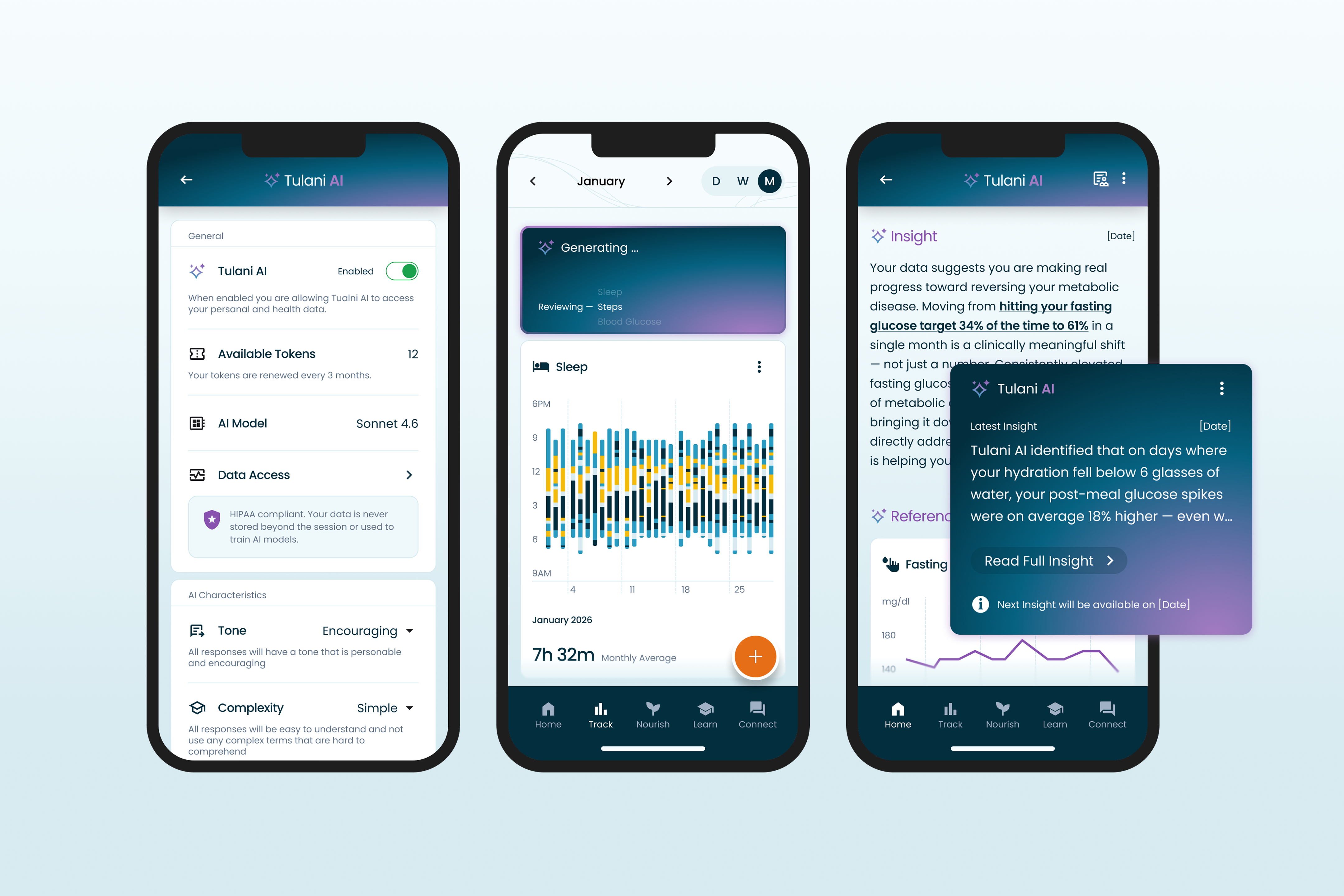
Five Tulani AI screens: opt in, generate, guide, act, and verify
01

Opt In

Members choose to turn on Tulani AI and see exactly which data it can access.

02

Generate

One tap creates an insight. No prompt writing needed.

03

Guide

Targeted questions narrow in on the insight that matters most.

04

Act

Takeaways turn the insight into a clear next step.

05

Verify

References show the exact data behind every insight.

00—Problem Framing

Members were dropping off, and the team assumed better charts and easier logging would fix it. After we shipped the new designs, engagement stayed flat. That told me the problem was not the interface.

The Problem

Data Visualization

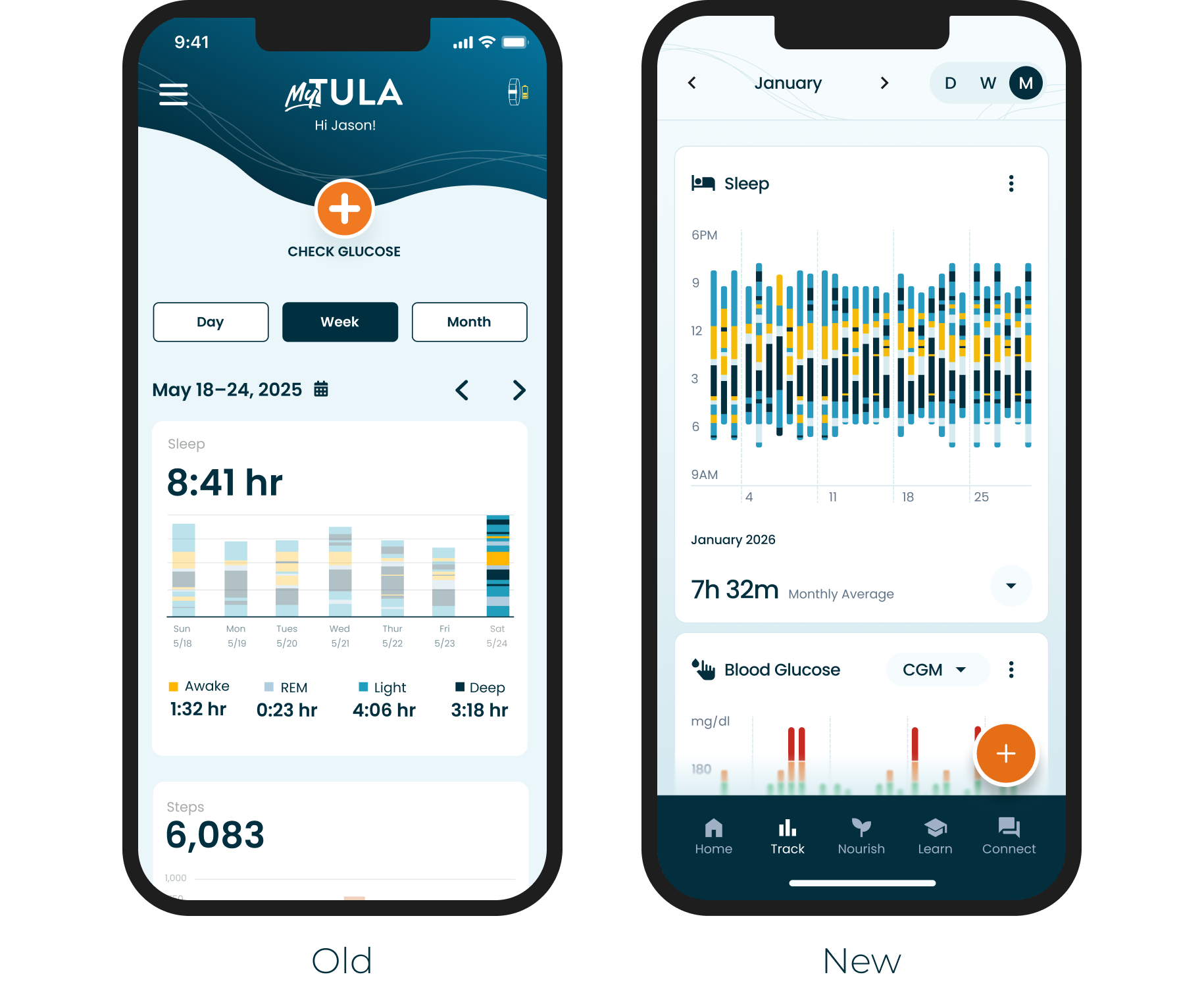
The team agreed the fix was to make the data more visually engaging and make logging easier, so I designed that experience first. I focused on:

  • Changing totals to timelines
  • Reducing clutter and improving visual hierarchy
  • Improving interaction patterns
  • Removing friction from manual inputs
Old and new sleep and glucose tracking screens from the visual redesign

Result of the redesign

After 10 weeks, engagement stayed flat. The problem was not the interface.

01—Reframed

When the redesign did not improve retention, I needed to understand why. I built two surveys: one for the health coaches who work with members every day, and one for members.

AI-enabled Research

Synthesized Research in Minutes, Not Days

I surveyed 15 health coaches and 25 members to understand why engagement dropped.

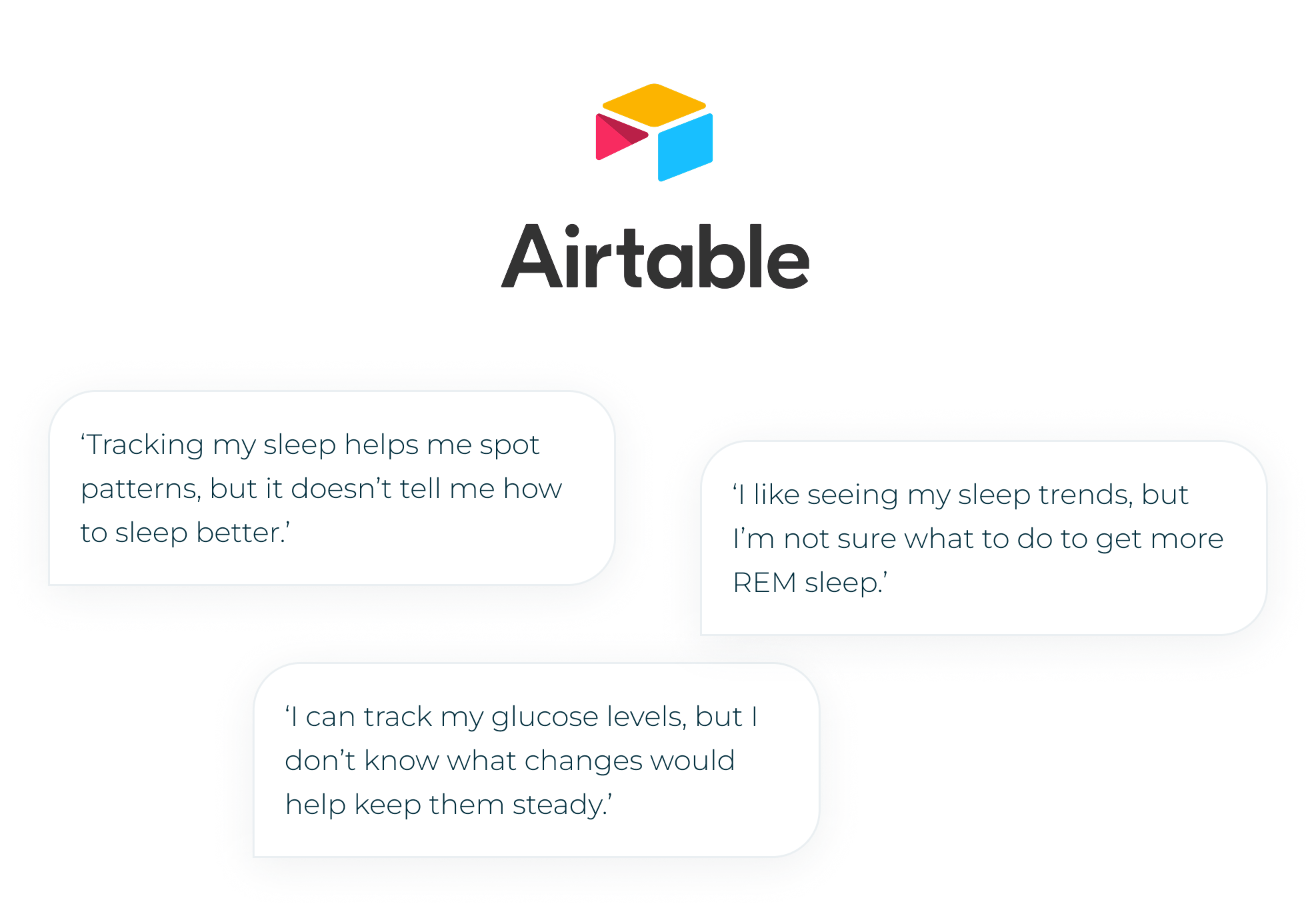
I used Airtable to house and synthesize the responses, and its AI features to surface common themes and outliers in minutes instead of the days manual synthesis would have taken.

A significant number of members described the same gap: they could see their data, but did not know what to do with it.

Airtable synthesis with member quotes: tracking sleep shows patterns but not how to sleep better; tracking glucose does not show what changes keep it steady; sleep trends do not explain how to get more REM sleep

Reframed Problem Statement

Members were collecting data they could not interpret, so tracking stopped feeling worth it.

02—Product Strategy

Members did not see enough value in tracking their health metrics. I needed to design a feature that helps members turn their own data into behavior change.

AI Product Framework

Mapping Needs to AI Functions

Was AI a good fit for this problem?

To answer that, I used a framework taught by NN/g for deciding when a co-intelligent solution is the right fit. You identify the core of the problem, then map it to one of the 4 ways AI can help.

Our problem mapped to Volume and Expertise: members had more data than they could read, and not enough expertise to interpret it. That pointed to Help Me Understand, which made AI a strong fit.

Step 1

Identify The Core Of The User Problem

Each problem statement maps to at least one of these 6 categories.

VolumeSelected
Decision
ExpertiseSelected
Discovery
Time
Quality

Step 2

Map your problem
to an AI Capability

AI can help with 4 different user goals.

Help Me UnderstandSelected
Help Me Decide
Help Me Create
Do It For Me

Note—AI Archetypes

When building a co-intelligent solution, it is important to understand how members will perceive it. Our members were most likely to treat Tulani AI as an Oracle: an authority that gives answers. In a health context, an authority that is wrong is risky, so every insight needed to show its sources and point members back to their care team.

Oracle

Users see the AI as an authority, not a collaborator. They expect definitive answers and want to know where the information comes from.

This archetype shows up when your product is perceived as an expert: research tools, Q&A products, anything presenting knowledge rather than options.

'You ask. It pronounces.'

Intern

Users bring healthy skepticism. They know the model can be wrong and expect to review its output before trusting it.

This archetype shows up in meeting transcription, writing assistants, and tools that take monotonous, time-intensive work off users' hands.

'Eager. Fallible. Needs Supervision.'

Collaborator

Users see the AI as a partner in the work, not a source or a servant. It helps them produce better output by filling gaps and offering insight along the way.

Products matching this archetype use permission gates and planning modes, and ask clarifying questions before proceeding.

'Peer. Plans together. Asks before acting.'

03—Jobs To Be Done

Before designing, I used the Jobs To Be Done framework to understand the full scope of what this feature needed to do. Mapping the Four Forces was the most influential part, because each force pointed to a specific design response.

JTBD Four Forces

Adoption

Pushes Away

Data piling up with no payoff. Members track daily, then ask: now what?

Design response: insights with clear Takeaways, so every check-in ends with a next step.

Adoption

Pulls Toward

Personalized answers on demand, with immediate gratification and a sense of ownership over their health.

Design response: one-tap generation that returns a personal answer in seconds.

Resistance to change

* Anxiety & Fear

Can I trust AI with my health data? What if it's wrong?

Design response: explicit opt-in, data access transparency, and auditable References.

Resistance to change

Habit

Passive tracking is comfortable. Questioning your own data is a new behavior that takes too much effort or understanding.

Design response: no prompt writing, plus guided follow-up questions that do the questioning for members.

* The Four Forces surfaced our biggest challenge: trust.

How might we foster TRUST in this co-intelligent companion?

04—Building Trust

Health data is sensitive. Explicit opt-in, transparent data access, and clear controls are non-negotiable design requirements before any AI can see a member’s personal metrics.

Trust & Explainability

Opt-in & HIPAA Compliance

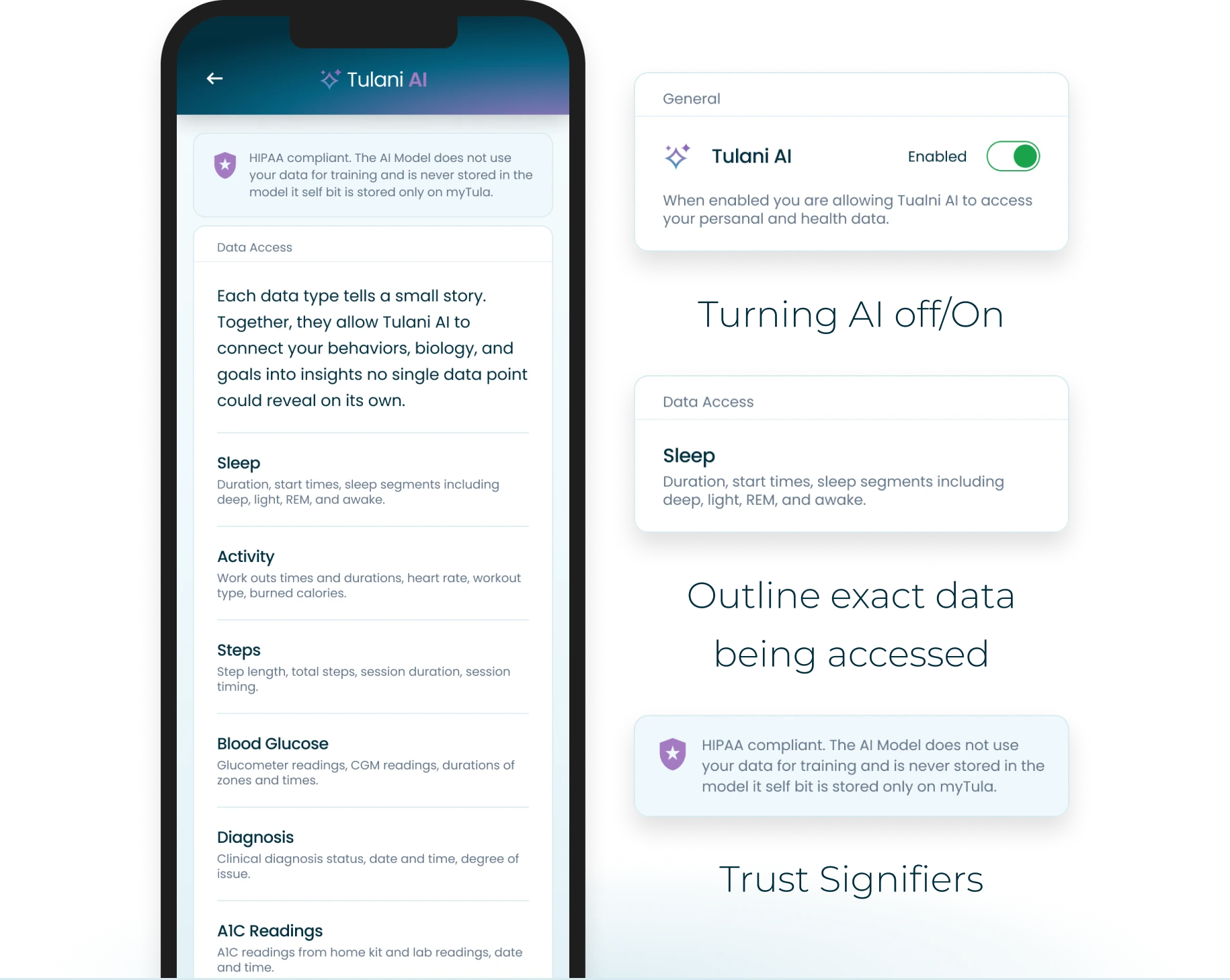
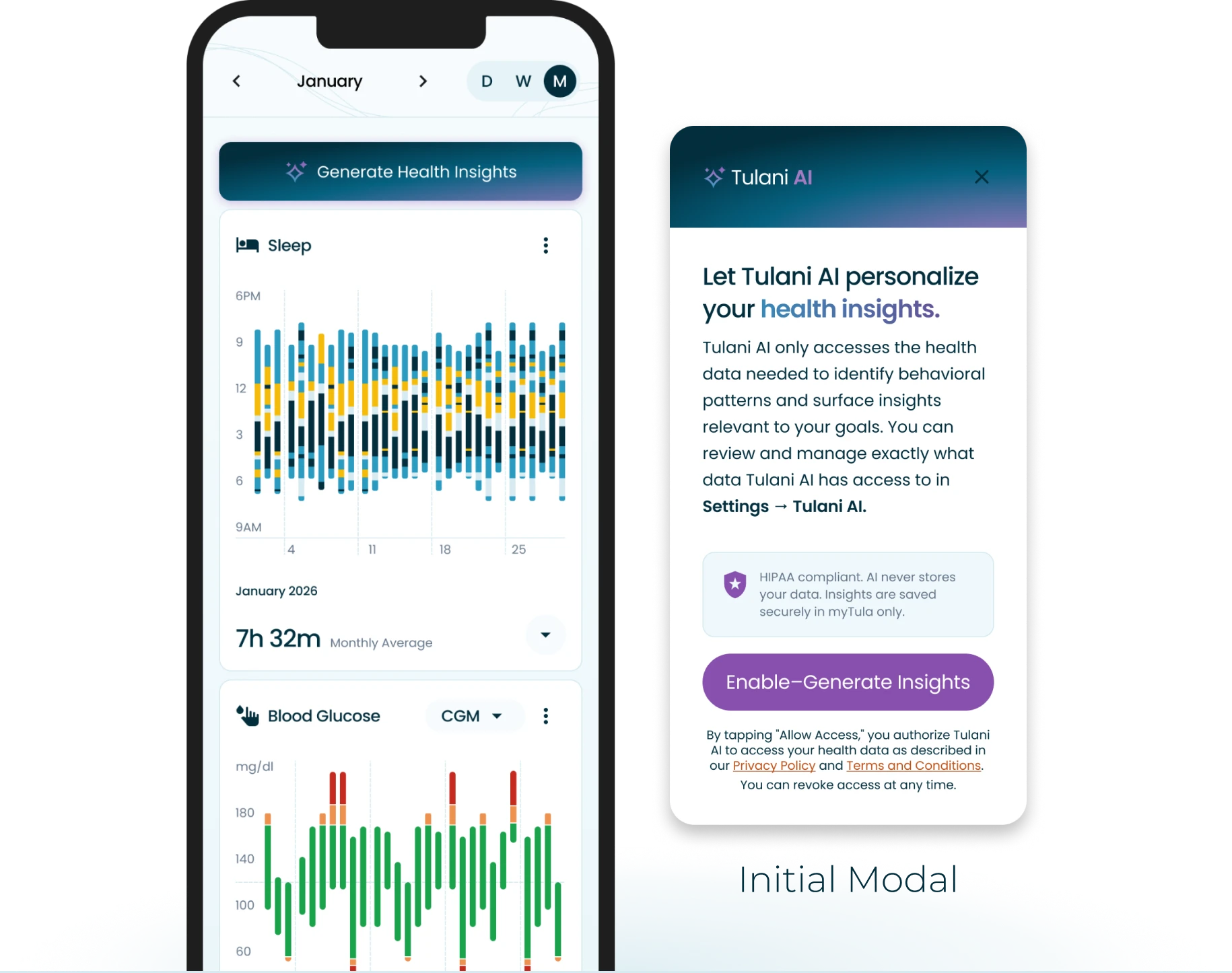
Users’ default response to AI systems is healthy skepticism, and rightly so. To support feature adoption and maintain HIPAA compliance, users must explicitly enable and opt in to Tulani AI before the system can access any of their personal health data.

Trust is built before the first insight is ever generated.

Tulani AI opt-in modal explaining what data is accessed, with HIPAA note and enable button
Settings for turning Tulani AI on or off, the exact data being accessed, and trust signifiers
Building Trust

Data Access Transparency

The biggest challenge in implementing AI is helping members feel comfortable letting a system access sensitive personal data. Trust that the system handles that data responsibly is essential, and transparency is the primary tool for earning it. Members can see exactly which data Tulani AI uses and can turn it off at any time.

Personalization & Control

Tone, Language & Control

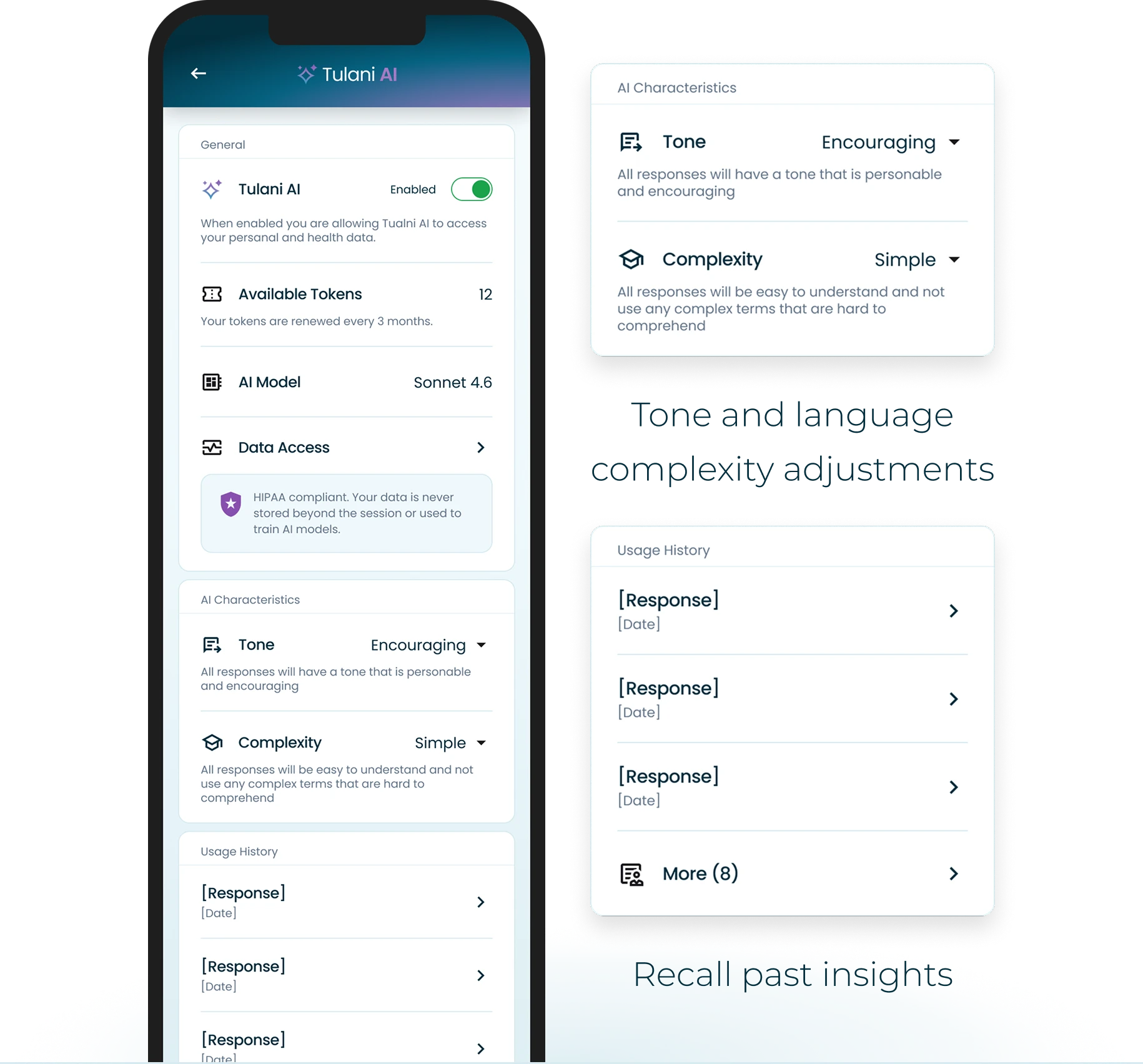
Because Tulani AI’s outputs are language-based insights, the system needs to meet members where they are. Responses that feel too clinical or detached can alienate the very people the product is trying to support. We added response settings that let members adjust the tone and language complexity of their insights, so the experience stays encouraging, readable, and light on cognitive load. Members can also recall past insights to see their progress over time.

Tone and language complexity settings and the past insights list

05—Usability & Trade-offs

Writing effective prompts is a skill most members don’t have. One-click generation removes the cognitive burden while guided follow-up questions help surface what’s actually useful.

Usability

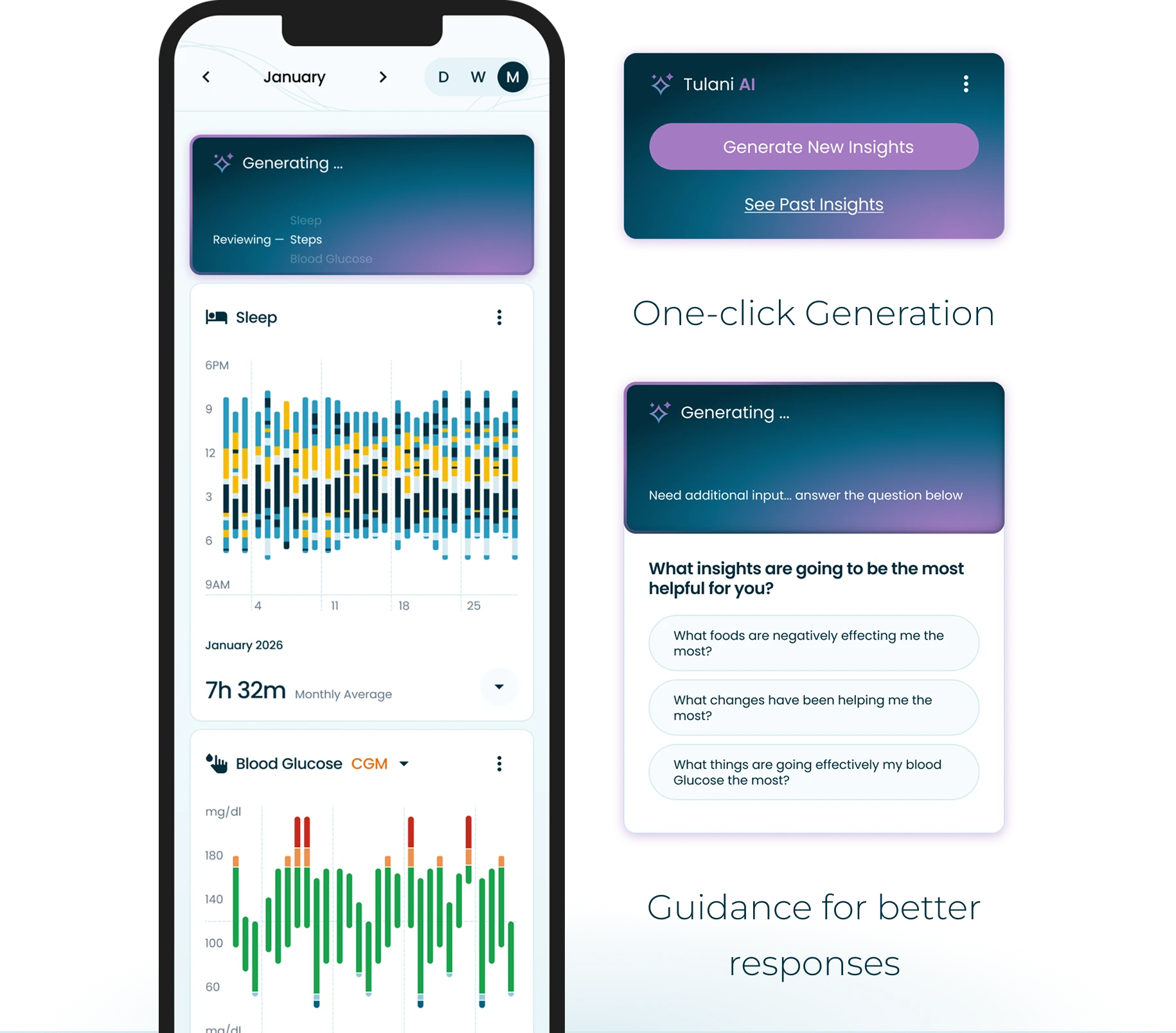
One-Click Generate & AI Guidance

Our research showed that members lacked the domain expertise to prompt an AI model effectively, so complex health data would go uninterpreted and the feature would go unused. To minimize the learning curve, we designed a one-click generation experience that removes the need to know what to ask. When the AI needs more context, it asks targeted questions about which insights would be most useful, guiding members toward better outputs without requiring them to understand how the model works. This mattered most for older members and members less comfortable with technology.

One-click Generate New Insights button and guided follow-up questions
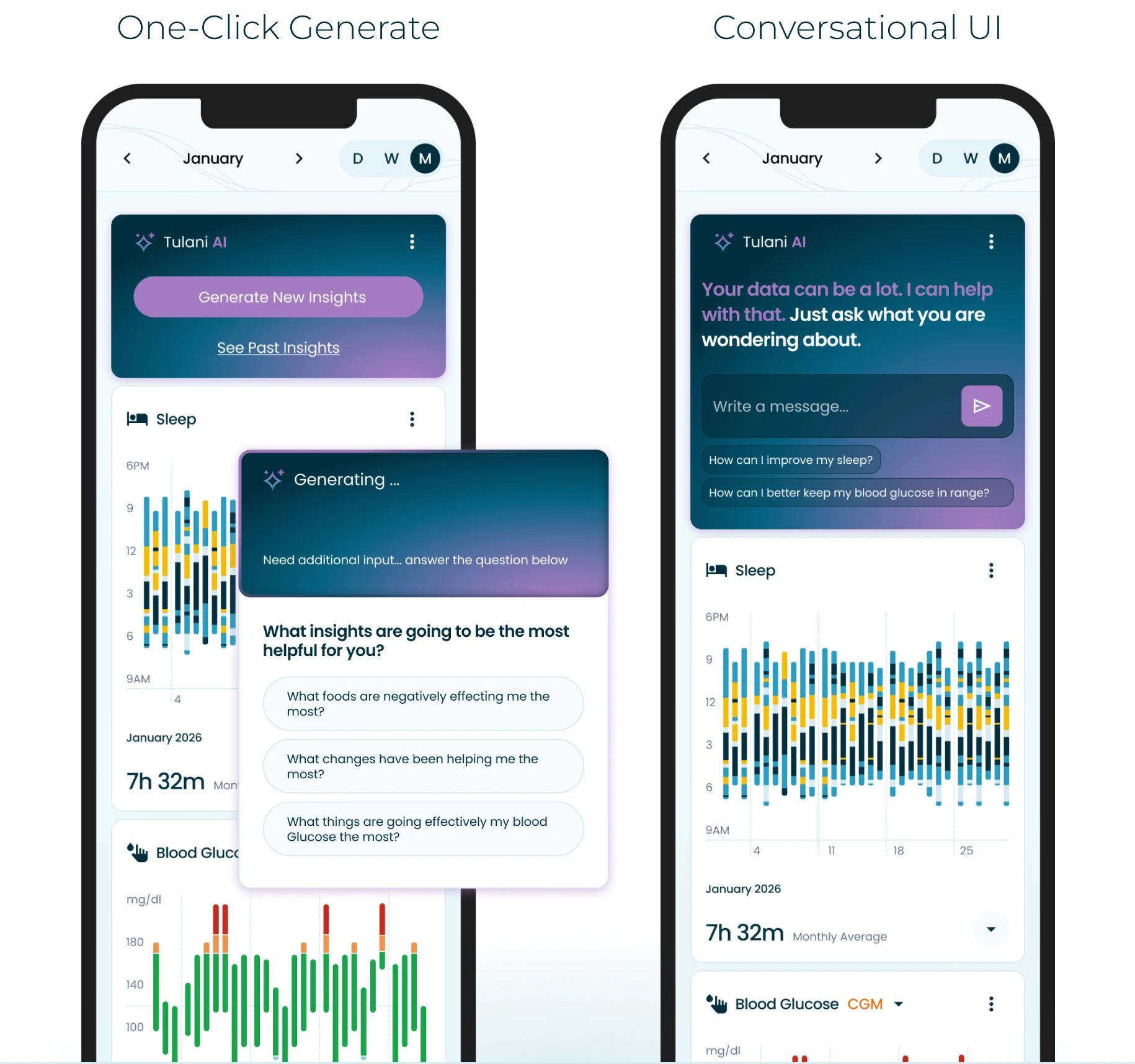
Side-by-side comparison of one-click generation and a conversational UI
Decision Point

Structured Controls vs Conversational UI

When exploring how members would start generating insights, we considered a conversational UI and a simpler, structured interaction model.

Conversational UI did not fit because:

  • Cognitive load: it relies on members already knowing what to ask.
  • AI fluency gap: older members and those less comfortable with AI would struggle to write effective prompts.
  • Guardrails: a structured, button-driven interface is far easier to constrain and validate than open-ended prompts, keeping responses within safe bounds.

One tap. No prompt-writing skills needed. Actionable, reliable insights in minutes.

06—Response Reliability

The model can generate unhelpful or inaccurate responses. In a health context, eroding trust is particularly costly. Takeaways and auditable references were designed to let members verify the basis of any insight.

Grounding & Oversight

Guardrails, Training & Feedback Loops

To align responses with the Live Tula program, we used retrieval-augmented generation (RAG) to ground the model in the Tula 10: a proprietary, 100+ page document outlining the 10 principles that guide all care. These principles provided guardrails for the model’s responses. The model also referenced health goals set by health coaches to ensure each response supported those goals.

As an extra layer, and to keep a human in the loop, health coaches, nurses, and dietitians reviewed responses. This ensured that every response lived up to the standards of the Live Tula program.

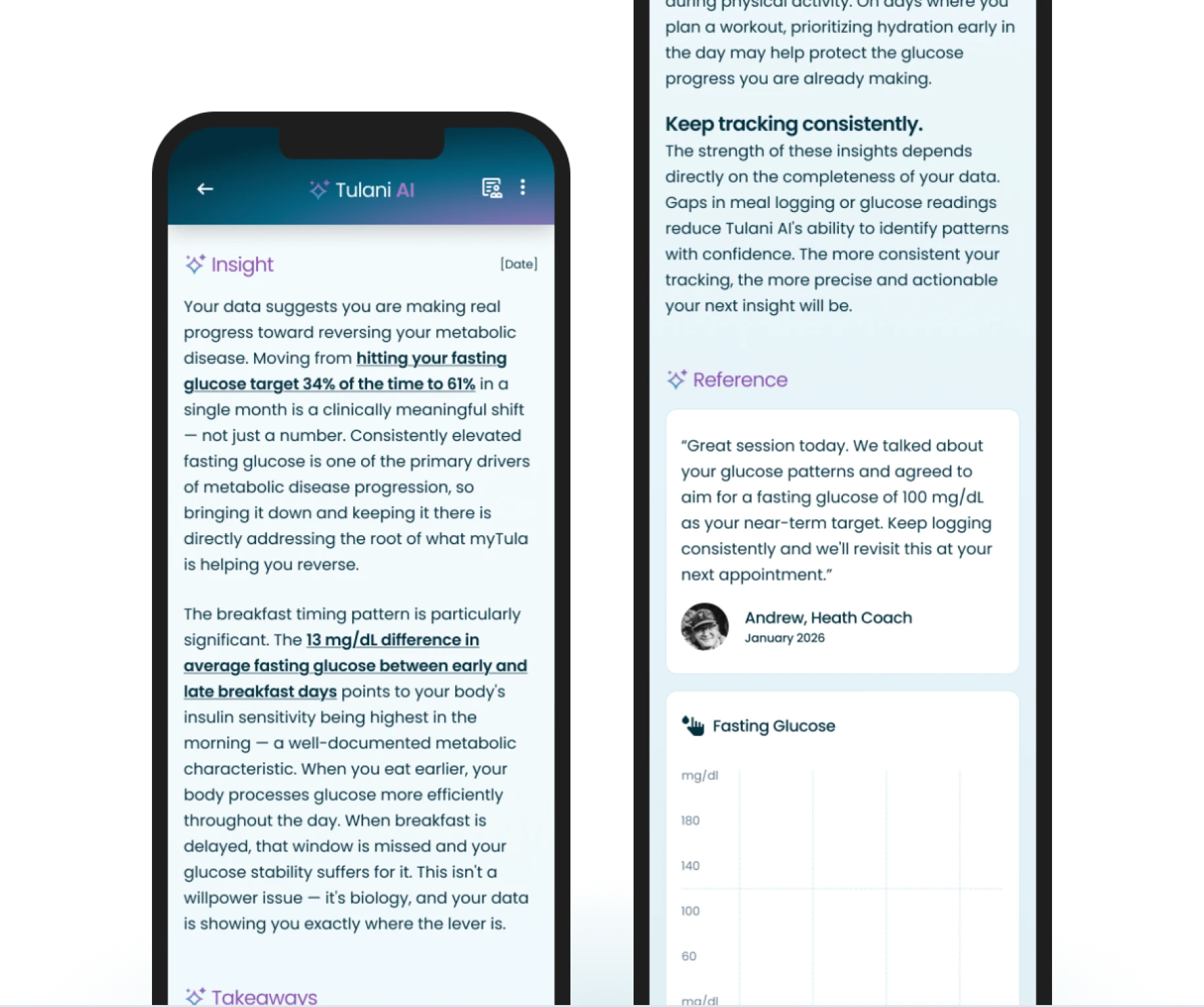
An insight with highlighted takeaways and a references section citing a health coach note and fasting glucose data
Building Trust

Actionable & Responsible Insights

Every response includes a Takeaways section with actionable next steps and a References section where members can audit the exact data points behind the insight, making the AI’s reasoning visible and verifiable.

07—Limitations

To balance data thresholds and token costs, I designed graceful states that never lead members to a dead end, with clear and specific microcopy.

Cost-Aware Design

Cost & Limited AI Tokens

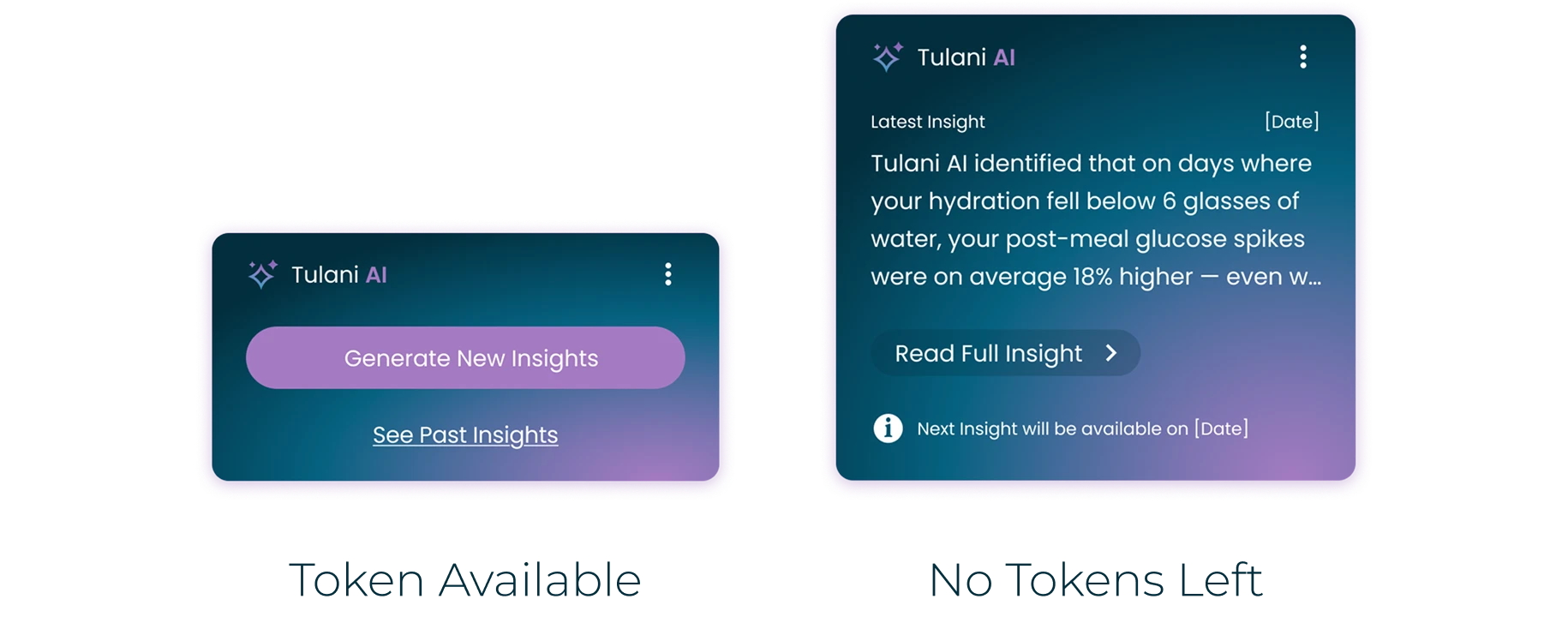
AI tokens are expensive, so limiting how many each member can use is essential for managing costs at scale. Exact pricing depends on the model and data volume. We set a limit of 1 insight per member per month. I also designed the state where a member runs out of tokens, so they always understand what happened.

Token available and no tokens left states
Graceful error states when there is not enough health data to generate an insight
Building Trust

Graceful Errors

When a member hasn’t logged enough health data to generate an insight, graceful error states explain the limit and suggest how to keep going.

Postscript—What I Would Do Next

When I left the project, Tulani AI was with early adopters. These are the open questions I would tackle next.

Identify AI Model & Cost

Early adopters used an interim model. Choosing the long-term model was still open. Next, I would compare models on cost, response quality, and reliability using a shared set of real member scenarios.

Budget & Performance

Validating Solutions

We had confirmed we were designing the right thing. Next, we needed to confirm we designed it right. Engagement was increasing, but we had not yet circled back with qualitative research. My next step would be follow-up interviews with early adopters and coaches.

Design Objective

HIPAA & PHI Compliant

HIPAA does not include AI-specific guidelines. During BAA negotiations we would need to define contracts, safeguards, and clear boundaries around what data the AI can access and whether any retention is permitted.

Compliance Objective

Data Thresholds

Every member has a different threshold for how much data they are willing to enter manually, and food logging is the most demanding example. Next, I would test the minimum data Tulani AI needs to generate meaningful insights.

Feasibility Objective
My Tula

Conclusion—Why this is Relevant

AI for Real User Problems

Validated the data-overload problem through coach and member surveys before touching AI. Applied the JTBD Four Forces to understand adoption dynamics, not just user desire.

Desirable, Feasible, Viable AI Products

Balanced member and coach needs against model constraints, compliance requirements, and cost-aware token design, not just what is technically possible.

Complex Capabilities Into Intuitive Experiences

One-click generation, guided inputs, plain language, and auditable references. AI that works for members managing a chronic condition, not just for people comfortable with technology.

Glymed+
Alignment for Business Outcomes
Glymed+

Alignment for
Business Outcomes

Prioritized key features to align with business goals, leading to a 20% growth in new accounts and improved customer satisfaction scores.

Intro—Project Overview

A luxury skincare brand was growing but wasting design time on wrong priorities. We reprioritized the roadmap, leading to improvements in bounce rates, cart abandonment, and user signups, proving that knowing what to design is crucial.

Glymed+

Glymed+ is a luxury professional skincare brand that sells through licensed skincare pros. Every customer is connected to a Pro, the distributor who recommends and supplies their products. The brand was already growing every year, so this project was about making sure limited design time went to the work that moved the business.

Role

I was the agency designer on Glymed+, with 10 hours a week on the product. I partnered with our agency PM and worked directly with Glymed’s President, Vice President. I facilitated the objectives workshop, built the scoring model with the team, and designed the signup, cart, and profile improvements.

The Problem

Priorities were dictated by subjective opinions, and there was no established method of measuring the performance of Glymedplus.com

Signup Impact

20%+ Growth in New Accounts

A clearer signup and Find a Pro flow, tracked with A/B tests.

Checkout Impact

Lower Cart Abandonment

An anonymous cart and a streamlined checkout made ordering easier.

00—Where we started

The Product Owner and stakeholders used a simplified MoSCoW method to prioritize the roadmap. I started down that list, fixing the Profile, Settings, and notifications. The UI got better, but one question kept coming up: was this making any difference?

Low Hanging Fruit

Settings & Reward Details

The settings page and rewards obviously needed a rework just by looking at it. I focused on adding clear editing paradigms, better hierarchy and organization. Improving the mobile version was essential as well, since most traffic was on mobile.

  • Hierarchy
  • Editing paradigms
  • Organization
  • Sub navigation improvements

While this did not have a direct impact on the bottom line, I believe it was essential.
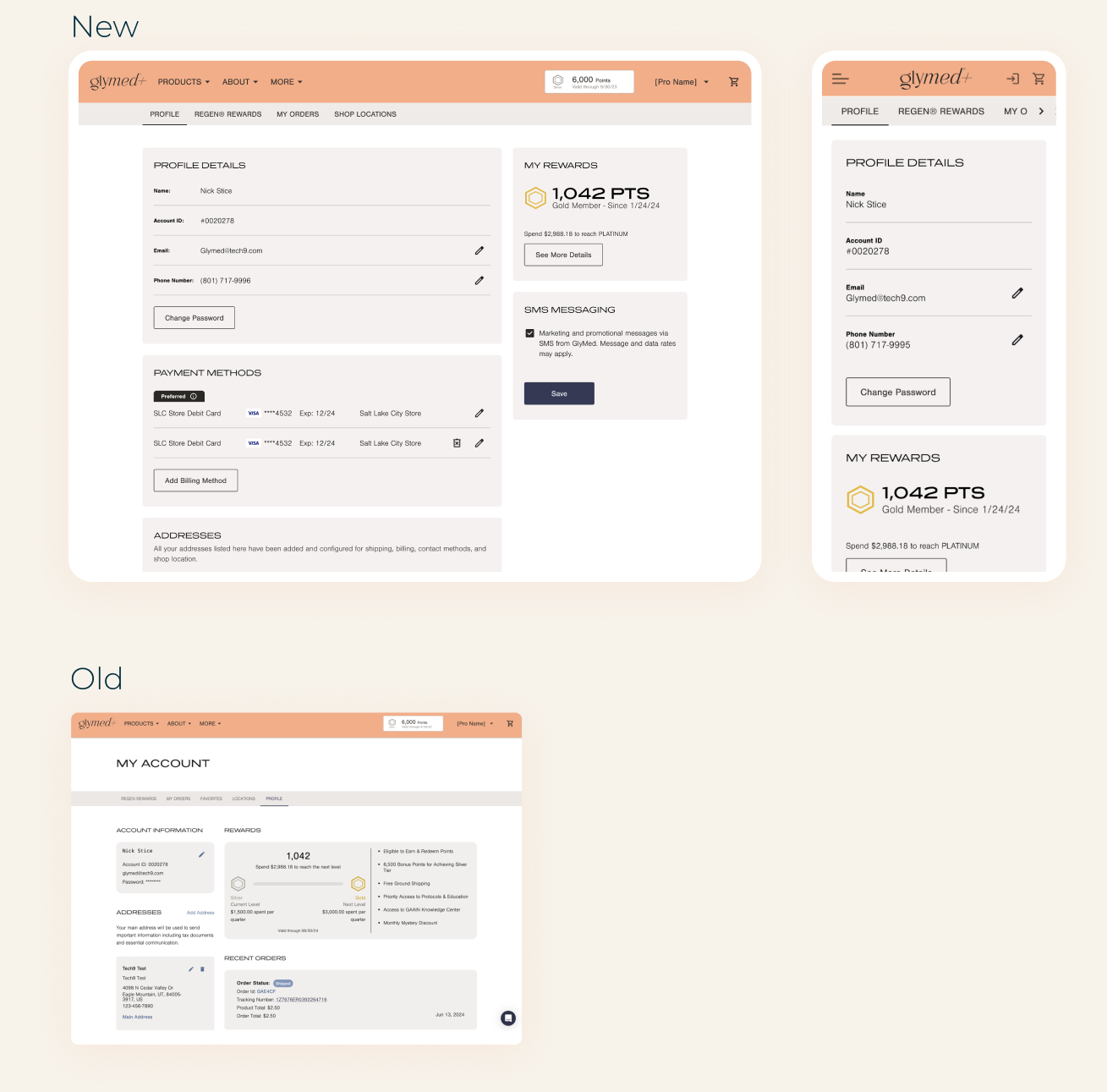
New desktop and mobile profile and rewards screens above the old My Account page

Was this making a difference?

01—Establish KPIs

It was hard to know what was working and what wasn’t without measuring the performance of the site. I worked with the PM and engineering to establish tracking hooks and an analytics tool.

Benchmarking

Quantitative Performance Data

Quantitative data provides a measurable baseline for evaluating performance, which was essential for the A/B testing that followed.

KPIs established for measurement:

  • Conversion
  • Acquisitions
  • Retention
  • Bounce rates
  • Abandon Cart
  • Scrolling depth

Beauty Industry Benchmark

Purchase conversion
2.5%
25 purchases / 1,000 sessions
Cart Abandonment
75%
750 abandoned / 1,000 carts
Paid CAC (beauty)
~$48
H&B retention (2024)
41.2%
Bounce Rate
38%

Industry benchmarks, not site results

02—Align On Business Objectives

I ran a small off-site workshop with the President, Vice President, and Product Owner, using an affinity map to surface the biggest pain points, which we converted into objectives.
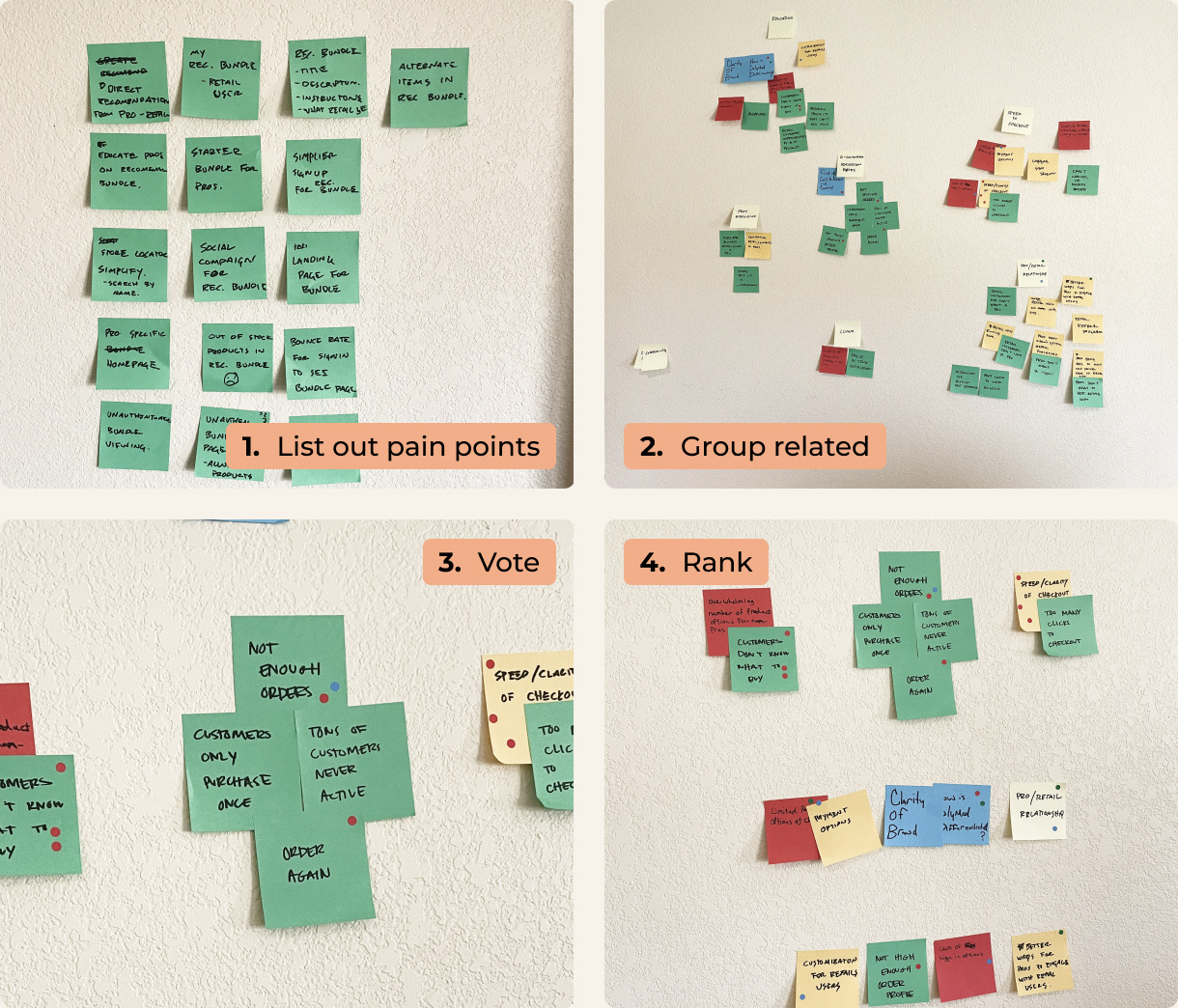
Four photos of the affinity map on a wall of sticky notes: 1. list out pain points, 2. group related, 3. vote, 4. rank
Workshop

Affinity Mapping With Leadership

Working with the team, we listed out all pain points. These came from customer reviews, complaints from distributors, business needs, and KPIs that were underperforming.

In identifying groupings, we worked to discover common themes and not just related or duplicates.

We voted on significant themes that seemed most impactful. The vote was essential for getting consensus on the objectives.

The highest ranking themes became the objectives.

Objectives—The 3 Objectives We Chose

As a team, we identified three major themes that became our objectives. They were based on the biggest pain points we identified for the platform. Objectives commonly align with these 3 KPIs: acquisition, adoption, and retention.

Product Education

Product discovery was low; customers relied on distributors to add items. Shoppers needed help understanding products and their benefits. High bounce rates on product pages indicated shoppers needed clarity before buying.

High bounce rates & low conversion & discovery

Ease of Ordering

The checkout flow was complicated and required users to sign in. There was no cart caching, and checkout was not anonymous.

Cart abandonment & reorder rate

Distribution Clarity

A complex distribution model was not conventional and the mental model was hard to grasp from the UI. Every customer has to be associated with a Pro. The Add a Pro step in signup had a high bounce rate.

Find a Pro bounce rate & signup abandonment

03—Prioritizing the Roadmap

With the objectives set, the next step was a scoring method to rank each feature by the impact it would make.

Prioritization Framework

Scoring the Roadmap

Each roadmap item got a t-shirt size score for each of the three objectives, based on how much it would move that objective.

We added the scores together, and the totals became the new priority order.

Glymed+ Roadmap

Initiative
Product Education
Ease of Ordering
Distribution Clarity
Distributors shop clarity
0
4
8
Signup page
0
4
8
Find a Pro
3
2
8
Anonymous checkout & Refinement
0
8
4

Proposed scores · 2 = Low · 4 = Moderate · 8 = High alignment

Focus on business initiatives, and replace opinions with a score to prioritize the roadmap.

04—What We Prioritized

A good product team balances three needs: user needs, business needs, and development needs. Once the roadmap followed our objectives, we shipped UI changes against them and used A/B tests through a CRO tool to find the best solutions.

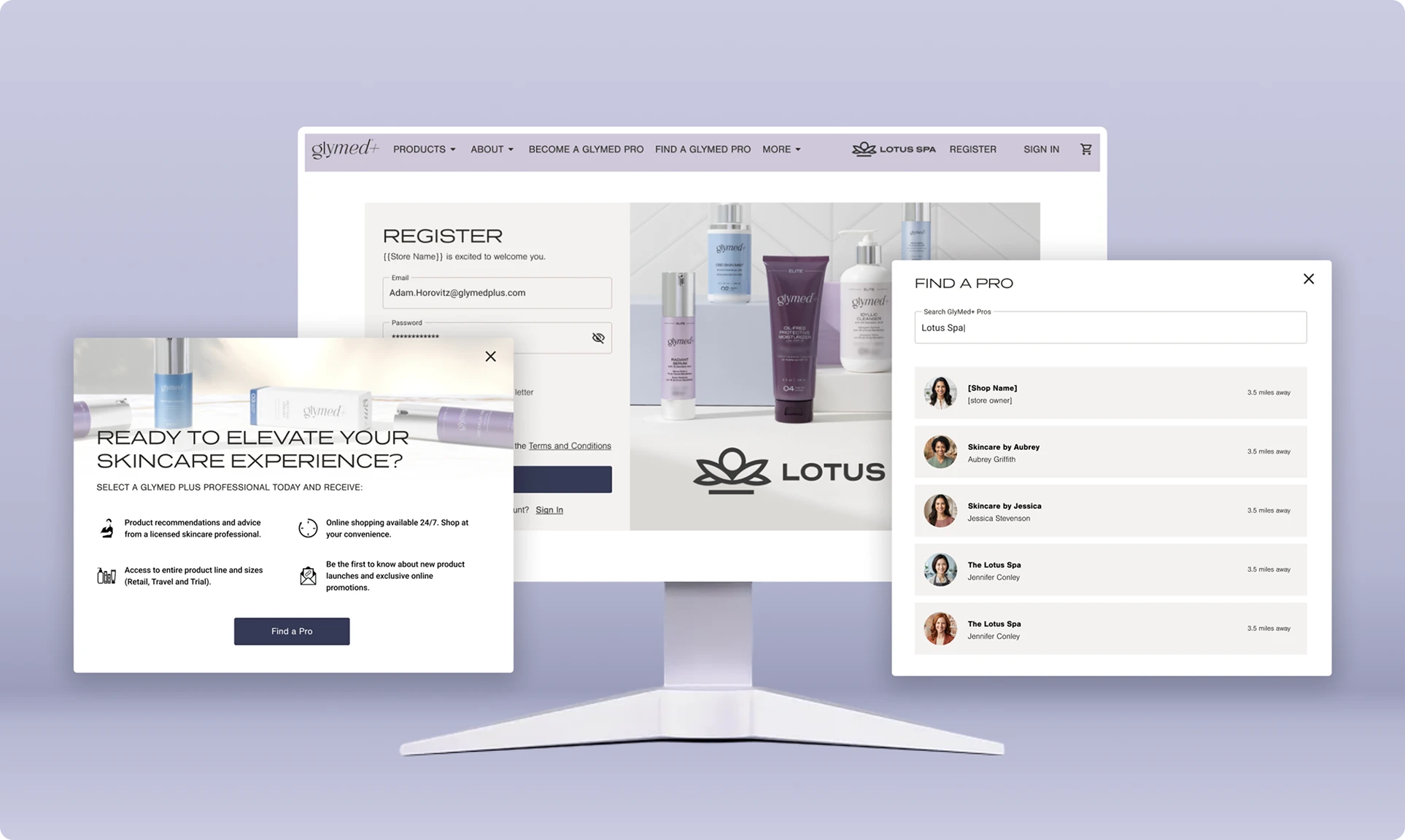
Before and after signup pages: the long Create an Account form next to the shorter Register form with distributor branding
Distribution Clarity

Clearer Signup

The long form of the original signup page had a high bounce rate. It was also clear from customer feedback that they didn’t know if they were signing up under the right distributor. So I focused on:

  • Reduced input fields to lower cognitive load
  • Created a place for distributor branding
  • Microcopy and password requirements
Distribution Clarity

Find a Pro

Glymed+ highly recommends that all customers be associated to a distributor, so customers who came to Glymed+ without a recommendation were failing to understand why they needed one. So I focused on:

  • Clear microcopy
  • Distributor discovery
  • Simplified flow
Find a Pro flow: an intro modal explaining why to choose a pro, and a searchable list of nearby pros
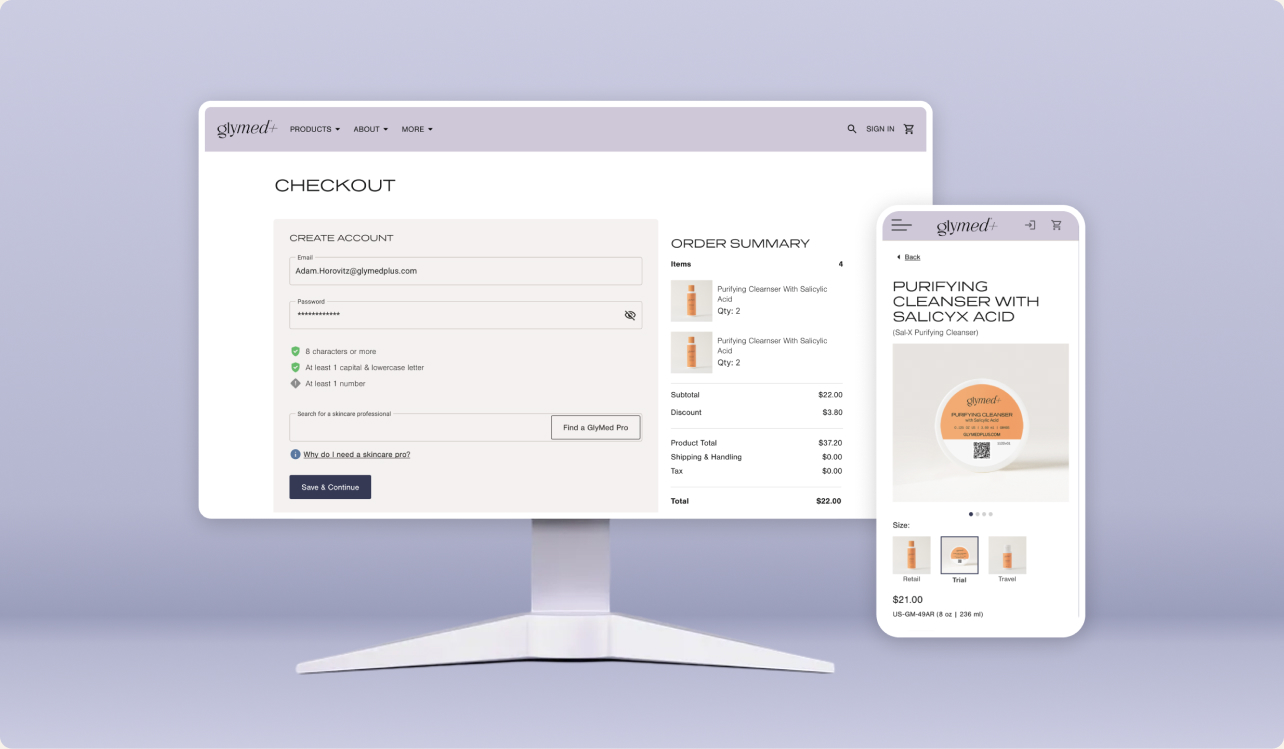
Streamlined checkout on desktop and the product details page on mobile
Ease of Ordering

Anonymous Cart & Simple Checkout

When auditing the checkout and signup flows, I discovered an opportunity to add anonymous checkout and cached carts for browsing customers. The product details page also had opportunities to increase clarity about the product and convert better.

Product Owner, Glymed+

“Being focused on those objectives, we’ve seen positive growth. More than we hoped for.”

Conclusion—Reflection

Since we have aligned on these objectives, we implemented a few UI changes to improve these experiences. We have also implemented an A/B testing method through a CRO tool to identify the best solutions. We have already seen incremental improvements in bounce rates, cart abandonment, and user signup.

Product Framework

Successful Products Balance Needs

I frequently shared this Venn diagram. It shows how a good product team has three needs. User Needs, Business Needs, and Development Needs. The sweet spot is when all these needs converge. Product teams are successful when they work on things that solve problems for their users, help market the product, and are feasible.
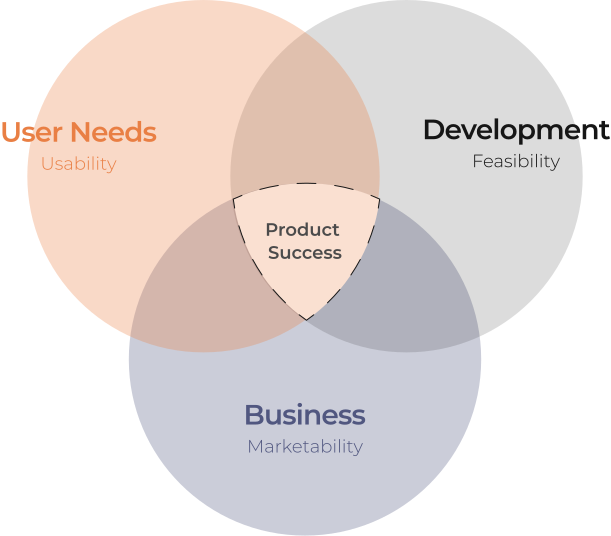
Venn diagram: User Needs (usability), Business (marketability), and Development (feasibility) overlap at Product Success

Postscript—Unintended Outcomes

While you hope every project creates positive change, improving one area often exposes a vulnerability in another. At Glymed+ we wanted to make it easier for customers to purchase on the site, and as we did, other challenges surfaced.

Security

Increased Fraudulent Orders

As we reduced friction in the signup flow, we saw an increase in fraudulent orders. These orders were being placed by bots and scammers. Engineering turned their focus toward this security issue once it was discovered, and orders were canceled.

Distribution Channels

Decrease in Distributor Satisfaction

Distributors get a portion of all sales that come through the Glymed+ site. So when they learned that anonymous orders could be placed, they were worried it would affect their sales numbers, since a new path for purchasing was introduced that did not require a distributor.
Glymed+

Conclusion—Why this is Relevant

Knowing What to Design

Moved a single designer’s 10 weekly hours from fixing what was broken to building what moved the business.
Objective Prioritization

Replaced subjective labels with a scoring model tied to measurable objectives the leadership team agreed on.

Usability Meets Business Outcomes

Shipped signup, cart, and Find a Pro improvements that lowered bounce and cart abandonment and grew new accounts.